
ساخت موشن گرافیک با هوش مصنوعی به شما کمک میکند بدون نیاز به تسلط بر نرمافزارهای پیچیده، ایدههایتان را به ویدیوهای متحرک تبدیل کنید. فرقی نمیکند تازهکار باشید یا تجربه کار با ابزارهای طراحی را داشته باشید؛ با کمک هوشا میتوانید با چند مرحله ساده، موشن گرافیکهایی متناسب با نیازتان بسازید.
آنچه در این آموزش میخوانید:
- موشن گرافیک با هوش مصنوعی چیست و چطور ساخته میشود؟
- نحوه ساخت موشن گرافیک در ۳ سطح مبتدی، متوسط و پیشرفته بهصورت تصویری
- ۴ نمونه موشن گرافیک ساخته شده با هوش مصنوعی در هوشا + پرامپت آماده
- نحوه تولید گویندگی فارسی، طراحی تصاویر مرجع و متحرکسازی آنها
- هزینه ساخت موشن گرافیک و محدودیتهای استفاده از هوش مصنوعی
موشن گرافیک با هوش مصنوعی چیست؟

موشن گرافیک با هوش مصنوعی یعنی حرکتدادن عناصر گرافیکی مثل آیکون، شکل و نوشته با کمک مدلهای هوش مصنوعی، بهجای انیمیت دستی فریمبهفریم. شما ایده، سبک مرجع و صدا را میدهید و مدل، حرکتها را طراحی میکند.
در ادامه یک نمونه موشن گرافیک ساخته شده با هوش مصنوعی در پلتفرم هوشا را میتوانید مشاهده کنید.
آموزش ساخت موشن گرافیک با هوش مصنوعی در هوشا
در این بخش نحوه ساخت ۴ نمونه موشن گرافیک با هوش مصنوعی را در ۳ سطح ساده، متوسط و پیشرفته به شما آموزش میدهیم.
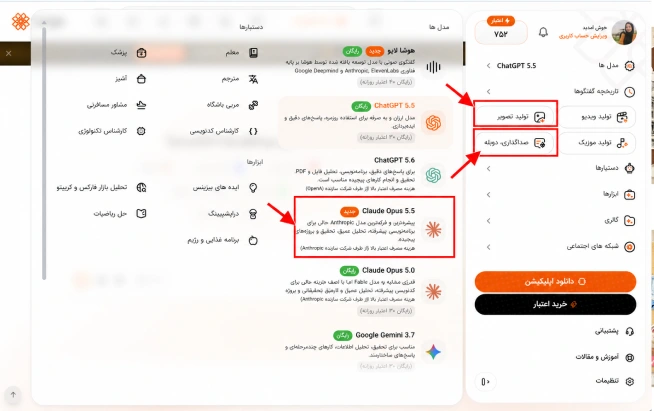
برای ساخت موشن گرافیک با هوش مصنوعی در پلتفرم هوشا بیشتر با مدل هوش مصنوعی کلود و سرویسهای ساخت عکس و دوبله سروکار دارید که نحوه دسترسی به هر ۳ را در تصویر زیر نشان دادهایم.
۱. آموزش ساخت موشن گرافی با هوش مصنوعی (نمونه اول سطح مبتدی)
در این آموزش یاد میگیرید در پلتفرم هوشا، با کمک یک ویدیوی مرجع، یک فایل صوتی و یک پرامپت، موشن گرافیک بسازید.
مرحله ۱: انتخاب ویدیوی مرجع
در شبکههای اجتماعی یک نمونه ویدیو موشن پیدا کنید که حرکت عناصر، سرعت تدوین و سبک بصری آن به هدف شما نزدیک باشد. بهعنوان مثال ما ویدیوی زیر را برای مرجع این تست انتخاب کردیم.
مرحله ۲: تولید گویندگی فارسی در هوشا
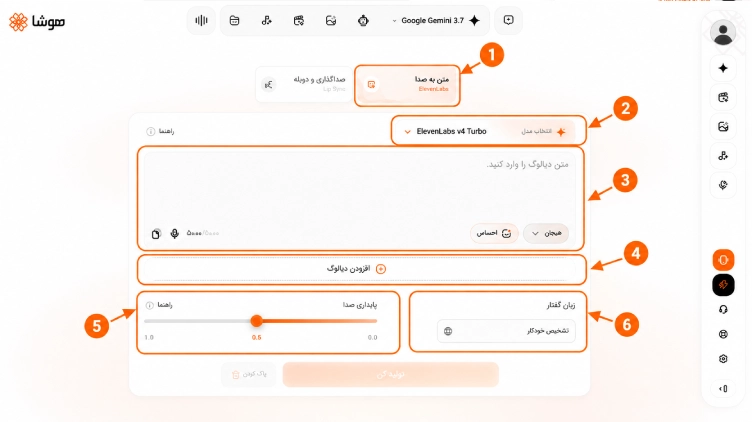
به سرویس «دوبله و صداگذاری» هوشا بروید، سپس:
- گزینه متن به صدا را انتخاب کنید
- مدل هوش مصنوعی مورد نظر را انتخاب کنید.
- متن دیالوگ مورد نظرتان را بنویسید و حالت و لحن آن (هیجانی، احساسی و…) را مشخص کنید.
- در صورت نیاز فایل دیالوگ را آپلود کنید.
- میزان پایداری صدا را تعیین کنید.
- زبان گوینده (فارسی، انگلیسی و…) را مشخص کنید.
در نهایت با زدن روی «دکمه تولید کن» صدای مورد نظرتان را بسازید.
مرحله ۳: ورود به چت و انتخاب مدل
چت هوشا را باز کنید و طبق تصویر اول، از فهرست مدلها، مدل Claude Opus نمایشدادهشده در حساب خود را انتخاب کنید.
مرحله ۴: بارگذاری فایلها و نوشتن پرامپت
ویدیوی مرجع و فایل صوتی که در مراحل قبل ساختید را به گفتوگو پیوست کنید. سپس در پرامپت، سبک بصری، ترتیب صحنهها، متنهای روی تصویر، ابعاد، مدت و هماهنگی حرکات با صدا را مشخص کنید.
برای نوشتن پرامپت میتوانید از مدلهای هوش مصنوعی موجود در هوشا مثل چت جی پی تی نیز استفاده کنید. کافی است ایده خود را به زبان فارسی و ساده شرح دهید تا پرامپت آن با جزئیات کامل نوشته شود.
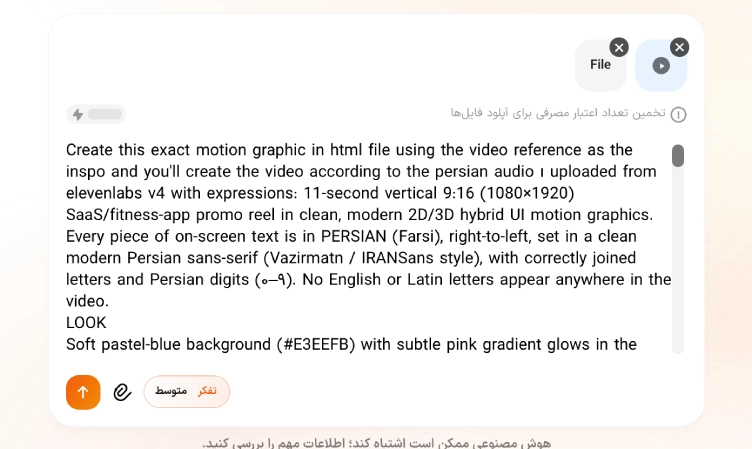
متن کامل پرامپت
| Create this exact motion graphic in html file using the video reference as the inspo and you’ll create the video according to the persian audio ı uploaded from elevenlabs v4 with expressions: 11-second vertical 9:16 (1080×1920) SaaS/fitness-app promo reel in clean, modern 2D/3D hybrid UI motion graphics. Every piece of on-screen text is in PERSIAN (Farsi), right-to-left, set in a clean modern Persian sans-serif (Vazirmatn / IRANSans style), with correctly joined letters and Persian digits (۰–۹). No English or Latin letters appear anywhere in the video.LOOKSoft pastel-blue background (#E3EEFB) with subtle pink gradient glows in the corners. Frosted glassmorphism cards with soft blur and gentle drop shadows. Pill-shaped buttons with soft shadows. Accent colours: app blue, fresh green for success, soft red for missed days. Playful accents: a glossy 3D grey dumbbell with a sad cartoon face and a small 2D running character. Motion: snappy spring easing (overshoot then settle), smooth 3D card tilts, kinetic typography and fluid morphing between UI elements. Because the layout is RTL, it is mirrored: rows read right-to-left, icons sit on the right of each row, checkmarks sit on the left, progress bars fill from right to left, and text reveals sweep from right to left. SHOTS0–1s: Pale-blue screen. A light-blue pill button pops into the centre with spring overshoot, while blue text «اوف!» types in right-to-left and scales up. The pill rotates slightly counterclockwise and stretches wide. A darker-blue progress bar fills it from right to left, revealing «پیچوندن باشگاه». A small blue dot pops above the bar, and a faint calendar card begins to materialise behind it. 1–2s: The calendar card snaps upright into sharp focus. Its header reads «فروردین ۱۴۰۵». The weekday row reads right-to-left «ش ی د س چ پ ج», and the date grid uses Persian digits. Red circles pop onto ۱، ۲، ۷، ۱۲، ۱۷، ۲۲. The pill morphs below the calendar to read «دوباره؟». Behind it, large semi-transparent grey text «باشگاه» and a 3D grey dumbbell with a sad face pop into the lower centre. A soft pink gradient glows in the bottom-left corner. 2–3s: The sad dumbbell and the «دوباره؟» pill drop out of frame, and the calendar tilts backward. A white frosted card titled «دفترچه تمرین» slides up from the bottom, tilting slightly. Green circular workout icons start to populate, and the first row «روز سینه» types in. 3–4s: The «دفترچه تمرین» card settles at a slight angle. Three rows animate in one after another, each with a green icon on the right and a thin divider: «روز سینه», «روز پشت», «روز پا». A green checkmark draws on the left of «روز سینه». At the bottom, a green-striped bar labelled «پیشرفت هفتگی» fills from right to left. 4–5s: The other two green checkmarks pop in on the card. The camera pans down, moving the card to the top half of the screen. Bold black text «به همه هدفهات برس» appears in the middle, and the «فروردین ۱۴۰۵» calendar card slides into the bottom half. Green circles with white checkmarks rapidly fill the calendar dates. 5–6s: Both cards float gently with a subtle 3D tilt while the last green checkmarks pop onto the calendar grid. 6–7s: All cards and text quickly scale down and collapse into the centre, morphing into a tilted white pill button reading «بزن بریم!». A small illustrated person runs from right to left inside the pill, and a small blue dot drops toward the bottom-right. 7–8s: The pill vanishes. Two vertical and two horizontal dashed grid lines draw across the screen and intersect around the centre. Black four-pointed star sparkles pop onto the top-right and bottom-left intersections. Inside the centre box, «قویترین نسخهی تو» animates in, its colour sweeping right-to-left from light blue to black. 8–9s: «قویترین نسخهی تو» turns fully black inside the dashed grid. Oversized light-blue text «شروع» slides horizontally from right to left across the lower background. 9–10s: The grid lines, sparkles and background text disappear. Clean black text «از امروز شروع میشه» springs into the centre of the solid pale-blue background. 10–11s: Hold on «از امروز شروع میشه», centred and perfectly still, with a very subtle settle. Clean end frame. SOUNDLight upbeat electronic beat. Soft UI pops, clicks and whooshes synced to each spring pop, checkmark and morph. I attached the persian voiceover with music as a mp4 file KEEP CONSISTENT- All on-screen text is Persian, right-to-left, with correctly connected letters. Never mirrored glyphs, broken letters or Latin characters.- Text is exactly as written in «» and appears exactly once at its time. No extra words, no subtitles.- All dates use Persian digits.- The layout is mirrored for RTL in every shot: progress bars fill right to left, icons sit on the right of each row, checkmarks on the left.- The pastel-blue background and pink corner glows stay the same throughout.- Spring overshoot easing on every pop. Nothing moves linearly or stiffly.- The clip ends on «از امروز شروع میشه». No logo and no extra end card., at the end render it in mp4 for me |
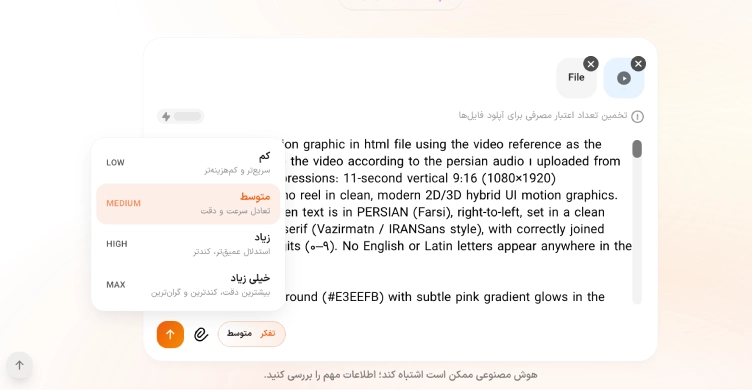
مرحله ۵: تنظیم میزان تفکر و مدیریت اعتبار
برای دریافت خروجی دقیقتر (خصوصا برای پروژههای پیچیده)، بهتر است که سطح تفکر را روی حالت بالاتر تنظیم کنید.
نکته: هر چه تایم ویدیو طولانیتر باشد، پروسه ساخت کلاد هم طولانیتر میشود و اعتبار بیشتری هم مصرف خواهد شد.
مرحله ۶: بازبینی، اصلاح و دریافت خروجی
خروجی داده شده را از نظر هماهنگی صدا و تصویر، خوانایی متن فارسی، روان بودن حرکتها، اندازه کادر و نمایش صحیح حروف بررسی کنید. برای اصلاح، میتوانید همان گفتوگو را ادامه دهید و تغییرات مورد نظرتان را دقیق بیان کنید؛ مثلا «فقط زمان نمایش تیتر دوم را یک ثانیه بیشتر کن و سایر صحنهها را ثابت نگه دار».
پس از تایید، نسخه نهایی دارای صدا را دانلود کنید.
آموزش ساخت ویدیو با هوش مصنوعی ایرانی هوشا
۲. ساخت موشن گرافیک با هوش مصنوعی (نمونه دوم سطح مبتدی)
طبق مراحل بالا و با استفاده از ویدیوی رفرنس و پرامپتی که در ادامه در اختیارتان قرار میدهیم یک نمونه ویدیو دیگر نیز خروجی گرفتهایم.
متن پرامپت:
| Create this exact motion graphic in html file in 3:4 ratio using the video reference as the inspo and you’ll create the video entirely with persian text all using the persian audio for iranian audience and make sure all the movements are smooth like the vid, this is the script of the audio: [curious] اولین آیفون تاشوی اپل حدود دو هزار دلاره. [candid] ولی این گوشی اصلاً برای فروش نیومده؛ اومده تا آیفون پرومکس به چشمتون ارزون بیاد. [serious] دقیقاً توی همون ماه، اپل قیمت آیفون پرو رو به هزار و صد و نود و نه دلار رسوند؛ یعنی صد دلار گرونتر از سال قبل. [ironic] اما کل تیترهای خبری فقط داشتن درباره گوشی تاشو حرف میزدن. [analytical] بیاین ببینیم پشت پرده چی میگذره. به این تکنیک میگن «لنگر انداختن». اولین عدد بزرگی که میبینید، ناخودآگاه میشه خطکش ذهنی شما. [persuasive] بعد از اینکه یه برچسب دو هزار دلاری دیدید، دادنِ هزار و سیصد دلار دیگه مثل یه معامله عالی به نظر میرسه. [conspiratorial] تازه این گوشی تاشو یه کار دیگه هم میکنه: یه پوشش عالی برای قایم کردن افزایش قیمتها درست میکنه. [instructional] این یه ترفند فوقالعادهست که خودتون هم میتونید ازش استفاده کنید: یه گزینه خیلی گرون و لوکس بذارید بالای منوتون و اول از همه نشونش بدید. [confident] حالا محصول اصلیتون دقیقاً زیر اون قرار میگیره و قیمتش کاملاً منطقی به نظر میآد. [thoughtful] دفعه بعد که خواستید چیزی بخرید، انگشتتون رو بذارید روی اون گرونترین قیمت و از خودتون بپرسید: [curious] اگه این گرونه اینجا نبود، بازم خرید این گزینه منطقی بود؟ [punchy] به این میگن حقه طعمه., at the end render it in mp4 for me |
۳. طراحی موشن گرافیک با هوش مصنوعی(سطح متوسط)
در این آموزش با استفاده از یک ویدیوی نمونه مرجع برای یک سایت موشن گرافیک طراحی کردهایم:
مرحله اول: انتخاب ویدیوی مرجع برای سبک موشنگرافیک
در پینترست یا سایر منابع تصویری، ویدیویی نزدیک به سبک مورد نظر پیدا کنید. به ریتم تدوین، حرکت نوشتهها، رنگها و زاویه دوربین توجه کنید. هدف، الگوبرداری از زبان بصری است؛ نه کپی مستقیم اثر.
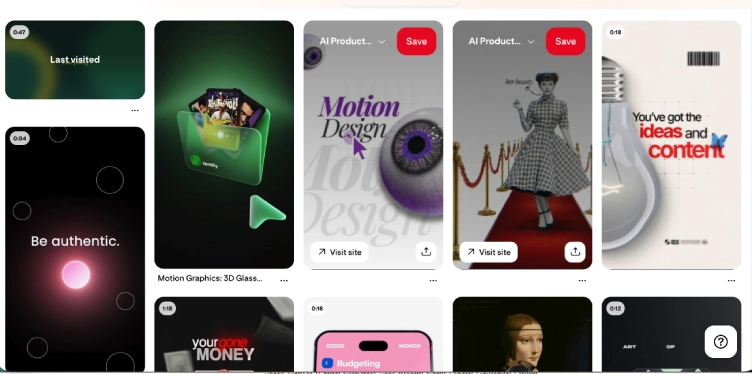
در این تست ما از ویدیوی زیر بهعنوان مرجع استفاده کردهایم:
فایل صوتی مورد نیاز برای این موشن گرافیک را نیز در سرویس دوبله و صداگذاری هوشا (طبق آموزش بالا) تولید کردیم:
مرحله دوم: ثبت ظاهر وبسایت و آمادهسازی منابع
از صفحه اصلی یا بخش مهم وبسایت اسکرینشات واضح بگیرید و آدرس آن را کپی کنید. این دو مرجع به مدل کمک میکنند رنگ سازمانی، چیدمان و عناصر رابط کاربری را بهتر بشناسد. در این آموزش، سایت سازیتو را برای نمونه انتخاب کردهایم.
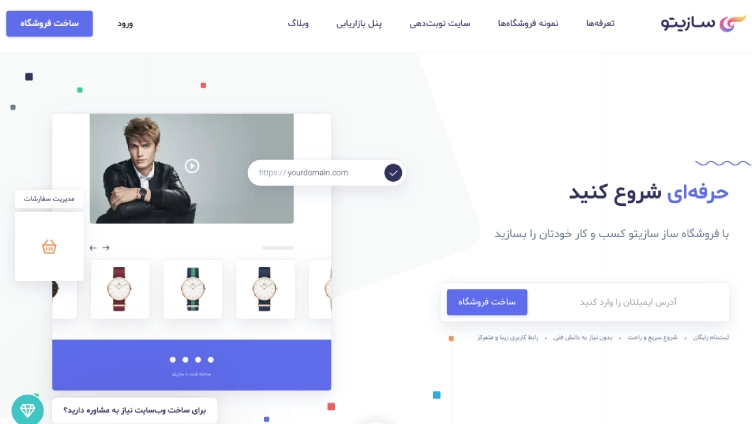
مرحله سوم: ورود به چت هوشا و انتخاب مدل Claude Opus
همانند آموزش اول، در منوی اصلی هوشا، مدل Claude Opus موجود در حساب خود را انتخاب کنید.
مرحله چهارم: بارگذاری فایلهای مرجع و نوشتن پرامپت ساخت ویدیو
ویدیوی مرجع، فایل صوتی مرجع (در صورت وجود)، اسکرینشات سایت و لینک آن را به گفتوگو اضافه کنید. سپس پرامپتی شامل هدف تبلیغ، زمانبندی، مشخصات فنی، سبک حرکت، متنهای فارسی و افکتهای صوتی ارسال کنید.
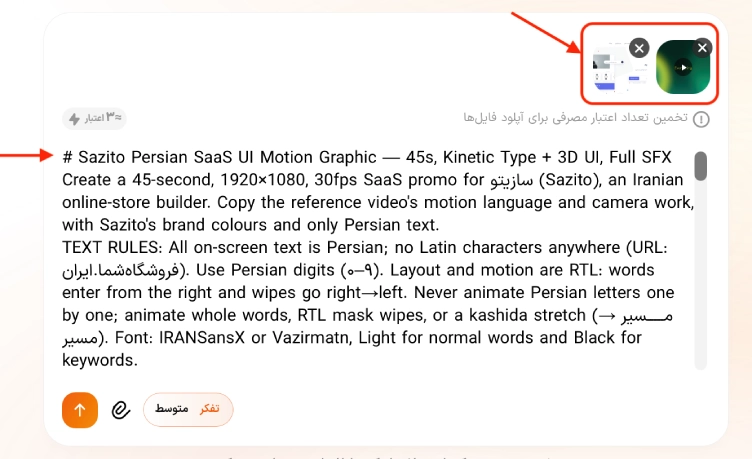
نحوه نوشتن پرامپت دقیق و حرفهای
برای دریافت پرامپت دقیقتر، ابتدا هدف ویدیو، مخاطب، هویت بصری سایت، مدت، ابعاد، متنهای فارسی و نوع حرکتها را مشخص کنید.
همچنین میتوانید از کلود بخواهید بر اساس فایلهای مرجع، یک پرامپت صحنهبهصحنه برایتان بنویسد.
نمونه درخواست برای تولید پرامپت: «براساس اسکرینشات وبسایت و ویدیوی مرجع پیوست، یک پرامپت حرفهای برای ساخت موشنگرافیک معرفی سایت بنویس. از سبک حرکت و تدوین مرجع الهام بگیر، اما هویت بصری و محتوای سایت من را حفظ کن. متنهای روی تصویر فارسی و راستبهچپ باشند. زمانبندی صحنهها، حرکت دوربین، ترنزیشنها و افکت صوتی هر بخش را مشخص کن.»
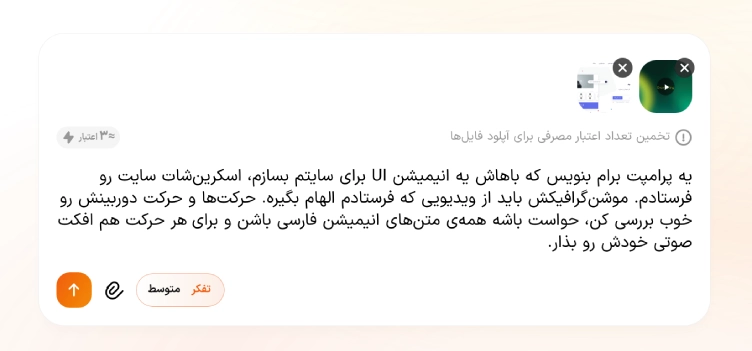
متن کامل پرامپت:
| # Sazito Persian SaaS UI Motion Graphic — 45s, Kinetic Type + 3D UI, Full SFX Create a 45-second, 1920×1080, 30fps SaaS promo for سازیتو (Sazito), an Iranian online-store builder. Copy the reference video’s motion language and camera work, with Sazito’s brand colours and only Persian text. TEXT RULES: All on-screen text is Persian; no Latin characters anywhere (URL: فروشگاهشما.ایران). Use Persian digits (۰–۹). Layout and motion are RTL: words enter from the right and wipes go right→left. Never animate Persian letters one by one; animate whole words, RTL mask wipes, or a kashida stretch (مـــــسیر → مسیر). Font: IRANSansX or Vazirmatn, Light for normal words and Black for keywords. LOOK: Dark scenes use a night indigo background (#12133A→#1D1F57) with blurred glowing orbs. Light scenes are white/lavender (#F3F4FC). Primary colour indigo #5B6CE6, ink navy #2B2B57, logo gradient #5B6CE6→#C86BC0→#F29A5B→#F6D15A. Small confetti squares float, as on the site. Frosted-glass UI panels with rim light. A glowing gradient “Spark” guide character leads every scene and morphs into the Sazito swirl logo at the end. CAMERA: Never static. Constant slow push-in with parallax, a zoom-through a glowing ring, roll and track around words, a 3D orbit around floating panels, a whip pan with a light streak, a rack focus on a blurred background, and a card popping out of a device frame. Easing: expo-out entrances, back-out pops with ~10% overshoot. Motion blur on fast moves. A new beat every 1–1.5s. SHOTS (each motion has its own SFX): 0–3s: Dark. «همهچیز با یک [جرقه] شروع میشود» builds word by word; «با یک» resolves from glitch blocks. A cursor clicks a toggle labelled «جرقه» and the Spark ignites. SFX: airy riser, word ticks, glitch chirp, cursor swish, mouse click, switch snap, glassy sparkle “ting”. 3–6s: Spark flies into a neon ring; camera zooms through it into thin intersecting circles. «ایده» is sliced away by the Spark, «محصول» pops in, camera rolls −15°. SFX: power-up hum, deep zoom whoosh plus sub thump, zip, bubble pop, low camera whoosh. 6–10s: «سؤال». The Spark becomes the dot of «؟». A glass square tilts in 3D: «اگر این ایده [رشد] کند چه؟», with a selection box around «رشد». The square rotates into a diamond, the Spark blooms into a blob wipe, then a whip pan. SFX: key clicks, droplet bounce, glass clink, selection-box click, twist, bloom swell, whip whoosh. 10–14s: Blurred background of the website hero mockup (model with watch, watch carousel). A dot grid ripples in; text «تبدیلِ ایدهها / به [فروشگاه آنلاین]» appears with an indigo highlight swipe; the URL pill slides in and its check pops. SFX: granular fizz, marker swipe, typing, swish, bubbly check, flash hit. 14–20s: Light. Stacked echo word «رشد» in indigo, then «سادگی» riding a thick gradient ribbon drawing an S-curve; mint doodle stickers (bag, tag, gift) pop. SFX: bloom chord, ratchet into a “clack”, elastic ribbon whip, satin swoosh, bubbly pops. 20–24s: The ribbon wraps around the store mockup. Text on the ribbon: «بدون کدنویسی • بدون دردسر • فقط فروش». The «مدیریت سفارشات» card pops in. A navy bar wipes from the right. SFX: satin swoosh with doppler, soft typing, pop plus a light “ka-ching”, strong whoosh plus thump. 24–28s: Dark. 3D glass dashboard panels fly in from depth while the camera orbits: «سلام، خوش آمدید», «نمودار فروش» with tooltip «۲۵٪+», a pie chart, «مهر ۱۴۰۵», «سفارشهای امروز: ۱۲۸». The chart line draws, then the panels scatter. SFX: staggered fwips plus glass ticks rising in pitch, synth sweep, boing, orbit whoosh, scatter shimmer. 28–32s: «طراحی، [مسیر خرید] را میسازد» with the kashida stretch. A phone frame fills with admin UI (gauges «۴۵٪» and «۶۰٪»). The card «سفارش جدید! ۴٬۸۰۰٬۰۰۰ تومان» pops out in 3D. SFX: glitch chirp, rubber stretch-snap, shimmer, UI tick cascade, 2-note notification chime. 32–36s: «قالبهای [هوشمند]» types with a block cursor. Glass tiles assemble; a neon path draws through them; «مدیریت آسان» appears; a checkbox ticks; the camera swings to frontal. SFX: key clicks, glass clicks, electric hum with a tok on each corner, tick plus success chime. 36–42s: «همه طراحی شده تا [فروش شما] را جلو ببرد», then a blob wipe. Stacked lines «چون / فروشگاهِ / خوب / فقط به [ظاهرش] نیست». SFX: word ticks, forward swoosh, liquid whomp, typewriter bursts, bright pluck. 42–45s: Light. «مهم این است که [چطور میفروشد]» with a gradient highlight swipe. «آمادهی رشد هستید؟». The Spark’s arc morphs into the Sazito logo. End card: «حرفهای شروع کنید» with an email field; a cursor clicks «ساخت فروشگاه» and confetti bursts. SFX: marker swipe, typing, shimmer into a 2-note logo sting, click plus “ding”, confetti pop. AUDIO: SFX-driven. Every entrance, exit, pop, wipe, click and camera move is heard, synced to the frame and panned with its motion. The Spark always uses the same sparkle “ting” as its sonic signature. Optional soft tech music bed at 100–110 BPM, ducked under the SFX. Master to −14 LUFS |
مرحله پنجم: بررسی خروجی، اصلاح صحنهها و دریافت ویدیو
پس از ارسال پرامپت، کلود شروع به ساخت موشن گرافیک میکند و شما میتوانید روند انجام کار را در همان گفتوگوی هوشا مشاهده کنید.
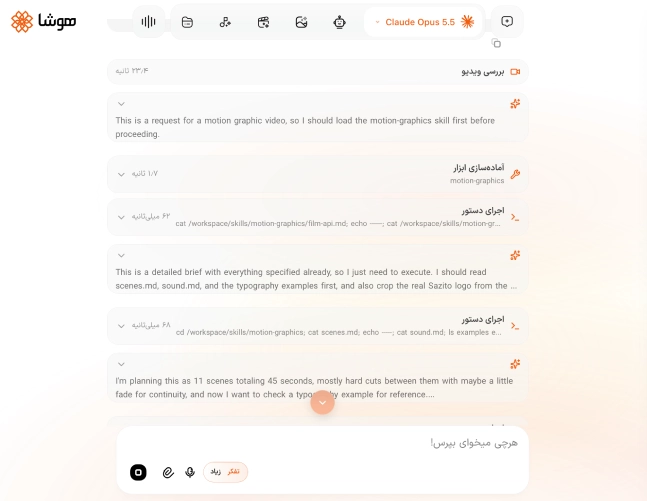
در نهایت پس از اتمام فرایند ساخت موشن گرافی، ویدیو را از نظر صحت نوشتههای فارسی، هماهنگی با برند، کیفیت انیمیشن، ریتم صحنهها و همزمانی صدا بررسی کنید و در صورت نیاز در ادامهی همان چت ویرایشهای مورد نظرتان را به کلود درخواست دهید.
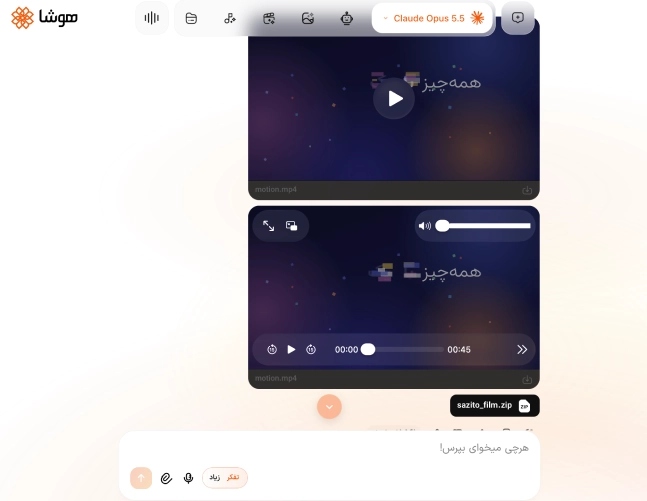
پس از تایید نسخه نهایی، خروجی دارای صدا را از بخش دانلود همان گفتوگو دریافت کنید.
۴. ساخت موشن گرافیک با هوش مصنوعی (سطح پیشرفته)
در این بخش به شما یاد میدهیم که چطور با متحرک سازی عکس با هوش مصنوعی، ویدیوهای موشن گرافیک بسازید.
مرحله اول: تولید گویندگی فارسی برای موشن گرافیک
مانند آموزش قبلی، وارد بخش «صداگذاری و دوبله» هوشا شوید.
یکی از مدلهای ElevenLabs را برای تبدیل متن به گفتار انتخاب کنید.
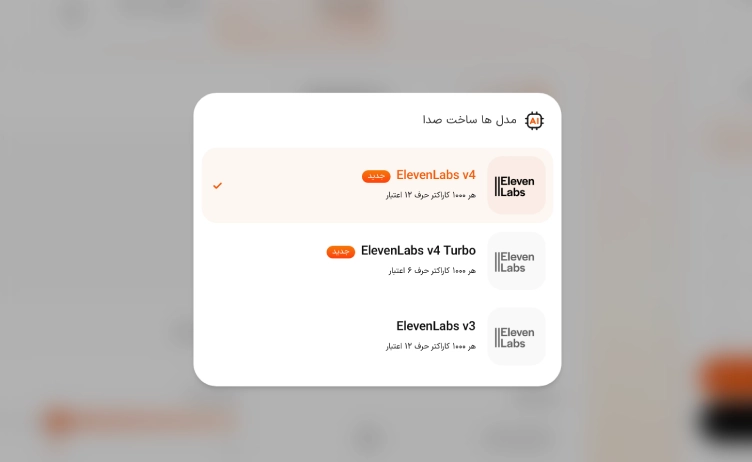
از فهرست صداها، گزینهای را انتخاب کنید که با لحن روایت و مخاطب ویدیو هماهنگ باشد. ابتدا، پیشنمایش هر صدا را گوش دهید و سپس صدای مورد نظر را انتخاب کنید.
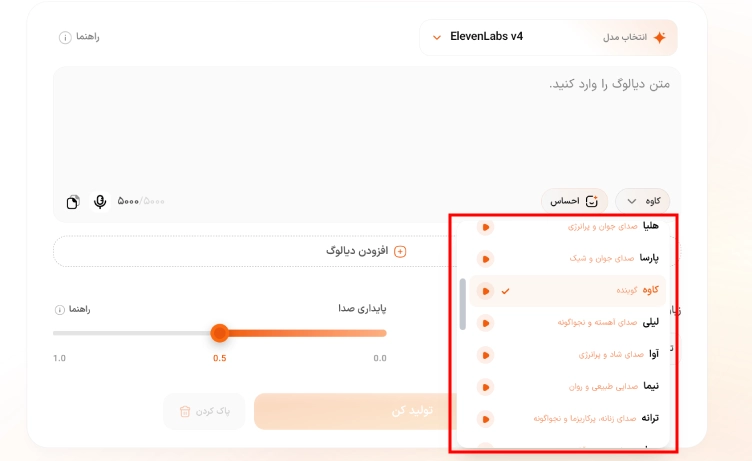
متن سناریو را در کادر مربوطه وارد کنید. برای طبیعیتر شدن گویندگی، جملهها را کوتاه و نشانهگذاری را دقیق تنظیم کنید.
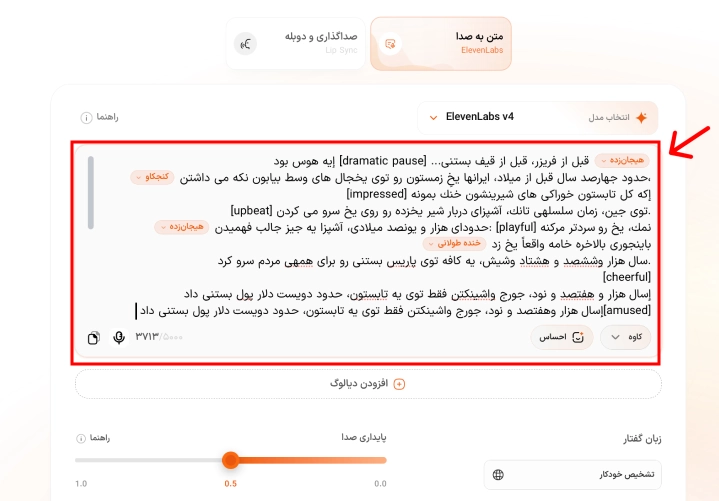
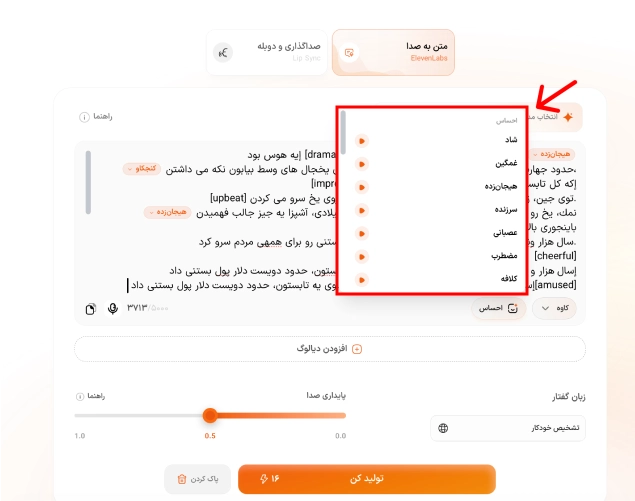
برای کنترل لحن اجرا، از بخش «احساس» و تگهای احساسی متناسب با هر جمله استفاده کنید. این تگها را فقط در بخشهایی قرار دهید که تغییر لحن لازم است.
در نهایت روی «تولید کن» بزنید، فایل صوتی را بررسی کنید و پس از اطمینان از تلفظ و مکثها، آن را دانلود کنید.
مرحله دوم: طراحی تصاویر مرجع با هوش مصنوعی
ابتدا در پینترست یا سایتهای مرجع، نمونههایی نزدیک به سبک بصری موردنظرتان پیدا کنید. در این آموزش، سبک کلاژ مطبوعاتی و روزنامهای مبنای طراحی است.
اگر ویدیویی با همین سبک پیدا کردید، آن را نیز بهعنوان مرجع حرکت، ترنزیشن و ریتم ذخیره کنید.
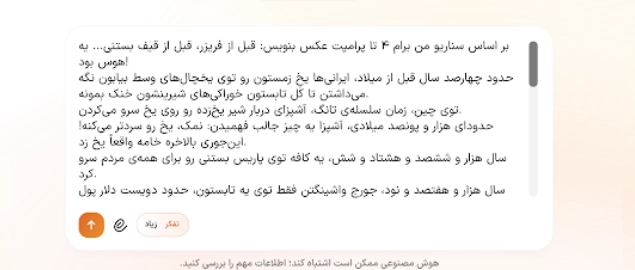
تصاویر مرجع را در گفتوگوی Claude بارگذاری کنید و بخواهید ویژگیهای مشترک آنها را تحلیل کند؛ سپس یک قالب پرامپت قابل تکرار برای تمام صحنههای سناریو بنویسد.
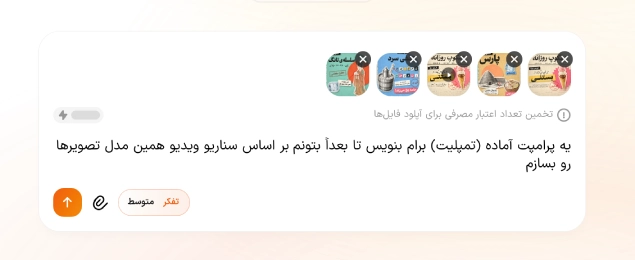
در ادامه قالب تولید شده توسط کلود را مشاهده میکنید. شما میتوانید این قالب را برای هر صحنه متناسب با سناریوی خود تکمیل کنید. عبارتهای داخل کروشه باید با اطلاعات همان صحنه جایگزین شوند.
| A vertical editorial collage poster in a retro newspaper scrapbook style, with Persian right-to-left typography. Background: aged cream newsprint with faint grey Persian headlines along the top edge. Over it lies a large torn-paper panel in flat [PANEL COLOR] with rough white deckled edges and visible paper fiber texture. Top right: a black label strip with white bold sans text “[CHAPTER NUMBER]”. Below it, a huge distressed black headline “[CHAPTER TITLE]” in a heavy Persian display font with worn letterpress ink texture. Center: [MAIN SUBJECT] rendered as [a vintage black-and-white engraving / a full-color photograph], cut out with a thick white sticker border and soft drop shadow, placed in front of a large flat [orange/red] circle. [SECONDARY ELEMENT] appears as a second sticker cut-out at [position]. Annotations: a white paper label held by translucent tape reads “[CAPTION]” in bold black Persian sans, connected to the subject by a hand-drawn red marker arrow. A [blue/pink] paper label strip reads “[LABEL]”. A circular red rubber stamp with uneven ink reads “[DATE]”. Bottom: a cream ruler-style timeline across the full width, with black tick marks and labels from left to right: [LABEL 1], [LABEL 2], … [LAST LABEL]. A small red triangle sits above “[CURRENT ERA]”, which is printed in red; all other labels are grey. Flat graphic collage, crisp print texture, soft shadows under the paper layers. Palette: 60% [panel color], 30% cream newsprint and black ink, 10% red accents. |
برای اینکه بتوانید پرامپت مربوط به هر تصویر را نیز با کلود شخصیسازی کنید کافی است که سناریو موشن گرافیک خود را در کادر پیام وارد و در انتهای پیام، تمپلیت ساخته شده توسط کلود را وارد کنید.
برای ساختن تصاویر مرجع ویدیو نیز میتوانید ساخت تصویر با هوش مصنوعی را در هوشا امتحان کنید. برای این کار سرویس ساخت عکس را از سایدبار سایت انتخاب و سپس مدل تصویرساز مورد نظر را انتخاب کنید.
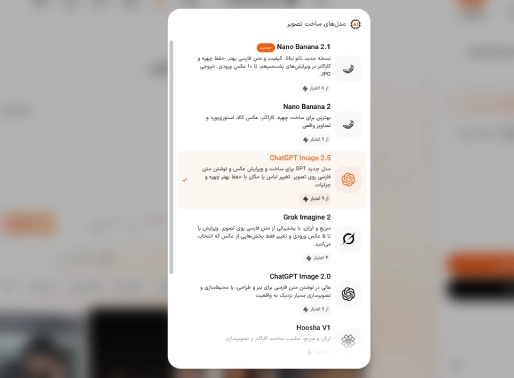
حال کافی است که پرامپتهایی که در مرحله قبل از کلود دریافت کردید را در کادر پیام جایگذاری کنید، تنظیمات مورد نظر شامل زمان و کیفیت ویدیو را مشخص کرده و سپس روی دکمه تولید کن بزنید تا عکس شما ساخته شود.
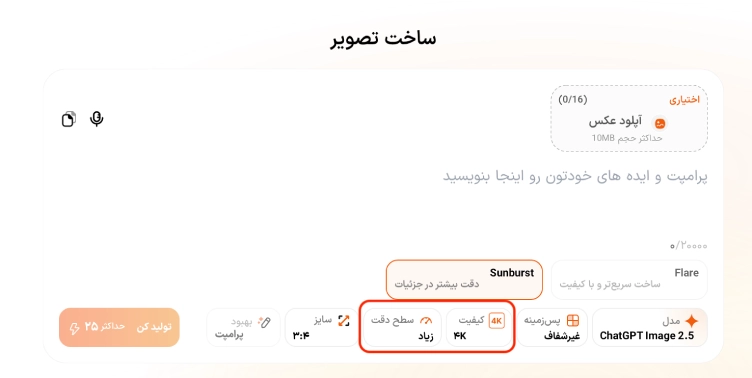
این فرایند را باید برای ساختن تک به تک تصاویر مورد نظر خود انجام دهید.
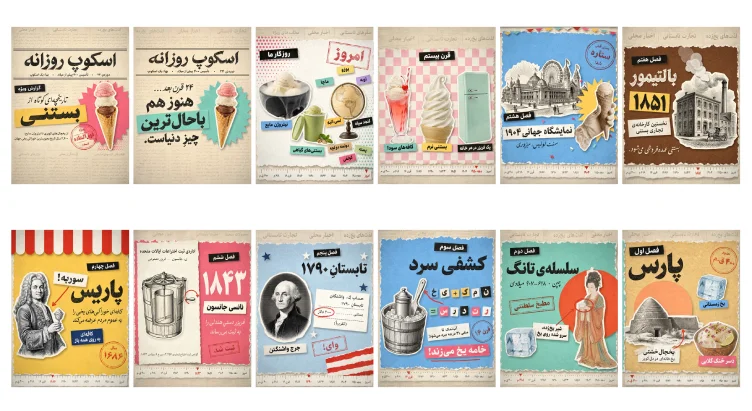
مرحله سوم: متحرکسازی تصاویر و ساخت موشن گرافیک
در این مرحله برای متحرک کردن تصاویر مرجع خود و ساخت ویدیو با هوش مصنوعی، وارد بخش چت هوشا شوید و مدل Claude Opus را انتخاب کنید.
سپس تصاویر مرجع، فایل گویندگی و موسیقی دلخواه را بارگذاری کنید. اگر ویدیوی نمونهای برای سبک حرکت دارید، آن را نیز اضافه کنید.
سطح تفکر را نیز متناسب با پیچیدگی پروژه انتخاب کنید.
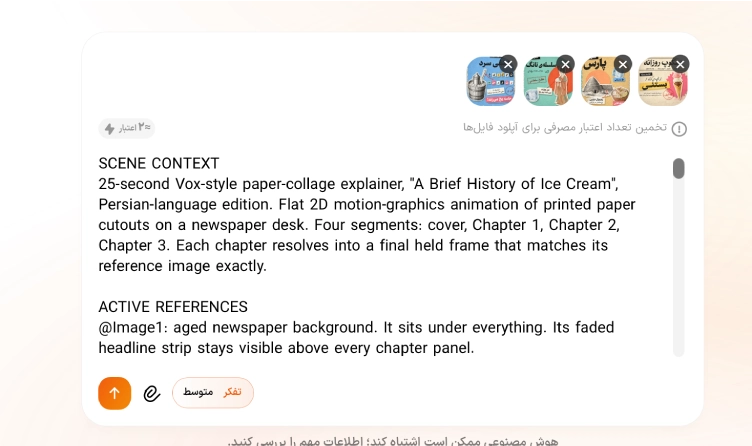
در درخواست ساخت ویدیو، مدت، ابعاد، ترتیب صحنهها، حرکت عناصر کلاژ، متنهای فارسی و هماهنگی با گویندگی را روشن بنویسید. در صورت نیاز، ابتدا از Claude بخواهید پرامپت اجرایی دقیقتری آماده کند.
در این مرحله ما از سه پرامپت زیر برای ساخت سه صحنه مختلف از موشن گرافیک مورد نظرمان استفاده کردهایم:
پرامپت اول + ویدیوی خروجی
| SCENE CONTEXT25-second Vox-style paper-collage explainer, “A Brief History of Ice Cream”, Persian-language edition. Flat 2D motion-graphics animation of printed paper cutouts on a newspaper desk. Four segments: cover, Chapter 1, Chapter 2, Chapter 3. Each chapter resolves into a final held frame that matches its reference image exactly. ACTIVE REFERENCES@Image1: aged newspaper background. It sits under everything. Its faded headline strip stays visible above every chapter panel.@Image2: cover page. This is the exact first frame.@Image3: Chapter 1 “پارس”. This is the exact final layout of segment 1.@Image4: Chapter 2 “سلسلهی تانگ”. This is the exact final layout of segment 2.@Image5: Chapter 3 “کشفی سرد”. This is the exact final layout of segment 3 and the last frame.All Persian lettering, numbers, colours, cutouts, stamps and positions match the references 100%. Text is copied from the references exactly. It never re-types, morphs, mirrors or translates. FORMAT MODE3:4 portrait, flat orthographic 2D. Camera locked off and front-on to the paper for the whole video. All motion comes from the paper pieces, not the camera. FIRST FRAMEThe first frame is @Image2 exactly: the masthead “اسکوپ روزانه”, the black tag “گزارش ویژه”, the yellow tape “بستنی”, the pink starburst with the triple-scoop cone on the right, and the red stamp. ACTION TIMING0.0–0.4s: Hold on the cover. The cone floats very slightly.0.4–0.9s: TRANSITION UP. The mustard torn-paper panel from @Image3 slides up from the bottom edge as one rigid sheet and covers the cover. The cream timeline ruler rides up with it and locks at the bottom of frame. The @Image1 headline strip remains visible at the top. The red triangle marker sits on “۴۰۰ ق.م”.0.9–1.2s: The yakhchal engraving cutout springs up from the bottom-left with a small overshoot bounce.1.2–1.4s: The black tag “فصل اول” slaps on at top-left.1.3–1.6s: The orange sun circle scales up behind the dome. At the same time, “پارس” slams in from oversized, blurred and semi-transparent to crisp black.1.6–1.9s: The round red stamp “حدود ۴۰۰ ق.م” thumps down at top-right, from oversized and faint to sharp, with a tiny frame shake.2.0–2.5s: The ice cube pops in on the right (scale 0 → 110% → 100%). The blue tag “یخ زمستانی” slaps on beneath it.4.4–5.2s: The taped caption card “یخچالِ خشتی / یخخانهای در دل کویر” slides up at bottom-left. The red curved arrow then draws itself upward into the yakhchal wall.5.6–6.3s: The copper bowl of rosewater noodles pops in at bottom-right. The pink tag “دسر خنکِ گلابی” slaps on below it.6.3–8.3s: Hold on @Image3 exactly. The cutouts breathe 1–2 px and their soft paper shadows stay fixed.8.3–8.8s: TRANSITION LEFT. The teal torn-paper panel from @Image4 slides in from screen-left and wipes over the mustard panel. The red timeline marker glides right to “۶۱۸ م”.8.9–9.3s: The Tang court lady cutout rises from the bottom-right, holding the white bowl at her chest. The red-orange circle grows behind her.9.3–9.7s: The tag “فصل دوم” slaps on. Then “سلسلهی تانگ” slams in from oversized and blurred to crisp.9.8–10.1s: “چین ۶۱۸–۹۰۷ میلادی” fades up beneath the title.10.0–10.3s: The ice cube pops in at bottom-left.11.0–11.3s: The rectangular red stamp “مطبخ سلطنتی” thumps down at mid-left.12.8–13.1s: The caption card “شیر یخزده، سرو شده روی یخ” slides in at centre.13.3–14.1s: A red hand-drawn ellipse draws itself around the bowl. Then the red arrow draws from the card to the ellipse.14.1–15.9s: Hold on @Image4 exactly.15.9–16.4s: TRANSITION DOWN. The blue torn-paper panel from @Image5 drops from the top edge and covers the teal panel. The red marker glides right to “قرن ۱۶”.16.5–16.8s: The engraved wooden ice-cream bucket with its metal canister and paddle slides in from screen-left and settles at mid-left.16.9–17.3s: The tag “فصل سوم” drops in. Then “کشفی سرد” slams in from oversized and blurred to crisp.17.4–17.7s: The round red stamp “قرن ۱۶” thumps down at right.19.6–20.6s: Ransom-note letter tiles in the top row pop in one at a time, right to left. Each tile lands with a slight tilt.20.6–20.9s: The red arrow draws itself from the tiles up to the bucket paddle.20.9–21.7s: The second row of tiles pops in one at a time, right to left.21.9–22.2s: The caption card “آبنمک تا منفی ۲۱ درجه سرد میشود!” slides in.23.2–23.8s: The pink banner “خامه یخ میزند!” slaps on. Then the red underline draws beneath it.23.8–25.0s: Hold on @Image5 exactly. This is the final frame. PHYSICSEvery piece behaves like stiff printed card stock with white die-cut borders. Entrances use snappy ease-out with a small overshoot and settle. Slams land hard with one micro-bounce. Panels slide as rigid flat sheets and never bend. Red arrows and circles draw on progressively like a marker stroke. Contact shadows stay soft and consistent. LIGHTINGEven, soft top-down tabletop light. Gentle paper drop-shadows fall down-right under every cutout. Paper grain and halftone texture are visible. AUDIOSound effects only. No voice, no narration, no music. A quiet paper-room tone runs throughout.Panel transitions: a fast paper whoosh ending in a flat paper slap.Cutout pops: a crisp card flick.Titles: a deep printed-letter thud.Stamps: a heavy rubber-stamp thump.Ice cubes: a light ice clink.Tags: a short tape rip and slap.Arrows and circles: a marker squeak.Letter tiles: one typewriter clack per tile.”خامه یخ میزند!” banner: a punchy paper slap with a soft pop. STYLEVox-style editorial collage. Vintage newspaper paper, torn deckled edges, engraved black-and-white illustrations mixed with photo cutouts, flat saturated paper colours (mustard, teal, sky blue, coral, pink), and red ink stamps. Clean motion-graphics timing. QUALITYSharp, stable picture with crisp legible lettering exactly as in the references. Brief natural motion blur appears only during slides and slams, and every piece resolves sharp at its landing. No flicker, no ghosting. POSITIVE CONSTRAINTSOnly the elements shown in @Image2–@Image5 appear, each in its exact reference position, size and colour. The timeline runs left (oldest) to right (today), and the red marker only moves rightward. Each chapter’s final hold is identical to its reference image. |
پرامپت دوم + ویدیوی خروجی
| SCENE CONTEXT25-second Vox-style paper-collage explainer, part 2 of “A Brief History of Ice Cream”, Persian-language edition. Flat 2D motion-graphics animation of printed paper cutouts on a vintage newspaper desk. Five segments: the end of Chapter 3, then Chapters 4, 5, 6 and 7. Each chapter builds element by element and resolves into a held frame that matches its reference image exactly. ACTIVE REFERENCES@Image1: Chapter 3 “کشفی سرد”, the blue panel. This is the exact first frame.@Image2: Chapter 4 “پاریس”, the yellow panel with the striped awning. This is the exact final layout of segment 2.@Image3: Chapter 5 “تابستانِ ۱۷۹۰”, the pale-blue panel. This is the exact final layout of segment 3.@Image4: Chapter 6 “۱۸۴۳”, the pink panel with the cream patent sheet. This is the exact final layout of segment 4.@Image5: Chapter 7 “بالتیمور”, the brown panel. This is the exact final layout of segment 5 and the last frame.All Persian lettering, numbers, colours, cutouts, stamps and positions match the references 100%. Text is copied from the references exactly. It never re-types, morphs, mirrors or translates. FORMAT MODE3:4 portrait, flat orthographic 2D. Camera locked off and front-on to the paper for the whole video. All motion comes from the paper pieces. FIRST FRAMEThe first frame is @Image1 exactly: the blue panel, the bucket, the letter tiles, the stamp “قرن ۱۶”, the pink banner “خامه یخ میزند!”, and the timeline ruler at the bottom with its red marker on “قرن ۱۶”. ACTION TIMING0.0–0.4s: Hold on @Image1.0.4–0.9s: TRANSITION FROM RIGHT. The yellow torn-paper panel from @Image2 slides in from screen-right as one rigid sheet and wipes over the blue panel from right to left. The timeline ruler stays fixed. The red marker glides right to “۱۶۸۶”.0.9–1.1s: The red-and-white scalloped awning drops down from the top edge, bounces once and settles across the top.1.0–1.3s: The engraved bewigged gentleman holding a sorbet glass slides in from screen-left and settles on the left half.1.3s: The black tag “فصل چهارم” slaps on at upper right.1.4–1.7s: “پاریس” slams in from oversized, blurred, semi-transparent and tilted about 8°, then rotates straight to crisp black.2.3–2.6s: The round red stamp “سال ۱۶۸۶” thumps down at bottom-right with a tiny frame shake.3.3–3.6s: The subtitle “کافهای خوراکی های یخی را به عموم مردم عرضه میکند” fades up one line at a time under the title.3.9–4.2s: The navy tag “کافهای به روی همه باز” slaps on.4.4–4.7s: The tilted card “سوربه!” slaps on above the title.5.0–5.4s: The red arrow draws itself from the card down-left to the gentleman’s chest.5.4–6.9s: Hold on @Image2 exactly.6.9–7.3s: TRANSITION UP. The pale-blue torn-paper panel from @Image3 slides up from the bottom edge and covers the yellow panel and the awning. The newspaper headline strip shows at the top. The red marker glides right to “۱۷۹۰”.7.4–7.6s: The torn red-and-white flag stripes slide in from the bottom-right corner.7.6–7.9s: The oval engraved portrait slides in from screen-left and settles at left-centre.7.9s: The tag “فصل پنجم” slaps on at top centre.8.0–8.2s: “تابستانِ ۱۷۹۰” slams in from oversized and blurred to crisp.8.2–8.6s: The navy and white paper stars pop in one at a time across the panel, each with a tiny spin.8.4–8.6s: The name card “جرج واشنگتن” slaps on under the portrait.8.9–9.4s: The ledger card “حساب گ. واشنگتن” slides up into place at right-centre and settles at a slight tilt.10.2–10.7s: A red hand-drawn ellipse draws itself around “۲۰۰ دلار”.11.5–11.8s: The rectangular red stamp “وای!” thumps down at bottom-centre.11.8–13.2s: Hold on @Image3 exactly.13.2–13.5s: TRANSITION FROM LEFT, PART 1. The pink torn-paper panel from @Image4 slides in from screen-left and covers the pale-blue panel. The red marker glides right to “۱۸۴۳”.13.5–13.9s: TRANSITION FROM LEFT, PART 2. The cream patent sheet slides in from screen-left on top of the pink panel and stops covering the left half. The right half stays pink.14.0s: The tag “فصل ششم” drops in at upper right.14.1–14.5s: The header “ادارهی ثبت اختراعات ایالات متحده” and the cutaway freezer engraving print onto the cream sheet, fading from a pale ghost to full black ink.14.4–14.6s: The huge white “۱۸۴۳” fades up from transparent to solid.14.7s: “ن. جانسون — فریزر مصنوعی” and the bottom certificate line fade in.15.2–15.5s: The red circular arrow draws itself around the crank. From here until the next transition, the crank handle turns clockwise continuously, about one revolution per 1.2 seconds.15.7s: The name card “نانسی جانسون” slaps on at right.16.2s: “فریزر دستی هندلی را به ثبت میرساند” fades up in white.17.8–18.1s: The red stamp “ثبت شد” thumps down at bottom-right.18.1–19.6s: Hold on @Image4 exactly. The crank keeps turning.19.6–20.0s: TRANSITION DOWN. The brown torn-paper panel from @Image5 drops from the top edge and covers the pink and cream sheets. The red marker glides right to “۱۸۵۱”.20.1–20.4s: The engraved factory cutout, with its chimney and horse cart, slides in from screen-right and settles on the right half.20.4s: The tag “فصل هفتم” slaps on at top-left.20.5–20.8s: “بالتیمور” fades in from blurred to crisp cream lettering.20.8–21.1s: The yellow tape “۱۸۵۱” slaps on tilted, then settles.21.5–21.8s: The card “نخستین کارخانهی تجاری بستنی” slaps on.22.0s onward: Translucent white paper-circle smoke puffs pop out of the chimney one at a time. Each one rises up-left, grows slightly and stacks toward the top edge. This continues to the end.22.6–22.9s: The script line “بستنی عمدهفروشی میشود.” writes on from right to left.22.9–25.0s: Hold on @Image5 exactly while the puffs keep drifting. This is the final frame. PHYSICSEvery piece behaves like stiff printed card stock with white die-cut borders. Entrances use snappy ease-out with a small overshoot and settle. Slams land hard with one micro-bounce. Panels slide as rigid flat sheets and never bend. The awning swings once on its top edge. Red arrows and ellipses draw on like a marker stroke. The crank rotates smoothly around its axle. Smoke puffs float softly upward. Paper drop-shadows stay soft and consistent. LIGHTINGEven, soft top-down tabletop light. Gentle drop-shadows fall down-right under every cutout. Paper grain, halftone and print texture are visible. AUDIOSound effects only. No voice, no narration, no music. A quiet paper-room tone runs throughout.Panel transitions: a fast paper whoosh ending in a flat paper slap.Awning: a fabric flap.Cutouts sliding in: a card swish.Titles: a deep printed-letter thud.Stamps: a heavy rubber-stamp thump.Stars: light paper ticks.Tags and cards: a short tape rip and slap.Arrows and ellipses: a marker squeak.Crank: a soft looping wooden-gear ratchet.Smoke puffs: gentle soft pops. STYLEVox-style editorial collage. Vintage newspaper paper, torn deckled edges, black-and-white engravings, flat saturated paper colours (mustard yellow, pale blue, coral pink, cream, chocolate brown, red-white stripes) and red ink stamps. Clean motion-graphics timing. QUALITYSharp, stable picture with crisp legible lettering exactly as in the references. Brief natural motion blur appears only during slides and slams, and every piece resolves sharp at its landing. No flicker, no ghosting. POSITIVE CONSTRAINTSOnly the elements shown in @Image1–@Image5 appear, each in its exact reference position, size and colour. The timeline ruler stays fixed at the bottom for the whole video, runs left (oldest) to right (today), and its red marker only moves rightward. Each chapter’s final hold is identical to its reference image. |
پرامپت سوم + ویدیوی خروجی
| SCENE CONTEXT25-second Vox-style paper-collage explainer, part 3 (finale) of “A Brief History of Ice Cream”, Persian-language edition. Flat 2D motion-graphics animation of printed paper cutouts on a vintage newspaper desk. Five segments: the end of Chapter 7, Chapter 8, the 20th century, the present day, and the newspaper-cover finale. Each segment builds element by element and resolves into a held frame that matches its reference image exactly. ACTIVE REFERENCES@Image1: Chapter 7 “بالتیمور ۱۸۵۱”, the brown panel with the factory. This is the exact first frame.@Image2: Chapter 8 “نمایشگاه جهانی ۱۹۰۴”, the blue panel with the bunting. This is the exact final layout of segment 2.@Image3: “قرن بیستم”, the pink-and-cream checkered panel. This is the exact final layout of segment 3.@Image4: “روزگار ما / امروز”, the cream panel with halftone dots. This is the exact final layout of segment 4.@Image5: the full newspaper cover “اسکوپ روزانه” with the cone. This is the exact final frame.All Persian lettering, numbers, colours, cutouts, stamps and positions match the references 100%. Text is copied from the references exactly. It never re-types, morphs, mirrors or translates. FORMAT MODE3:4 portrait, flat orthographic 2D. Camera locked off and front-on to the paper for the whole video. All motion comes from the paper pieces. FIRST FRAMEThe first frame is @Image1 exactly: the brown panel, the factory engraving with its paper smoke puffs, “بالتیمور”, the yellow tape “۱۸۵۱”, and the timeline ruler with its red marker on “۱۸۵۱”. ACTION TIMING0.0–0.2s: Hold on @Image1. The smoke puffs drift slightly upward.0.2–0.5s: TRANSITION FROM RIGHT. The blue torn-paper panel from @Image2 slides in from screen-right as one rigid sheet and wipes over the brown panel. The timeline ruler stays fixed. The red marker glides right to “۱۹۰۴”.0.5–0.6s: The string of coloured paper pennants drops in along the top edge and swings once.0.5–0.8s: The engraved fairground cutout, with its palace, Ferris wheel and towers, drops down from the top and settles across the upper half.0.8s: The black tag “فصل هشتم” slaps on at left, overlapping the bottom of the engraving.0.9–1.0s: The title card “نمایشگاه جهانی ۱۹۰۴” slides in from screen-left and settles.1.0–1.2s: The script line “سنت لوئیس، میزوری” fades up beneath it.2.4–2.7s: The yellow starburst and the gloved hand holding the waffle cone pop in from the right edge with an overshoot bounce.2.9–3.2s: A burst of small paper confetti flies out from the cone. At the same moment, the round red stamp “بستنی قیفی ستاره شد!” thumps down at top-right with a tiny frame shake.3.2–4.8s: Hold on @Image2 exactly while the confetti flutters down and settles into its reference positions.4.8–5.2s: TRANSITION UP. The pink-and-cream checkered panel from @Image3 slides up from the bottom edge and covers the blue panel and the pennants. The newspaper headline strip shows at the top. The red marker glides right to “دهه ۱۹۵۰”.5.3–5.5s: The black tag “قرن بیستم” drops in from the top and settles at top-centre.5.9–6.2s: The ice-cream soda float glass rises from the bottom into the left third with a small bounce.6.4s: The teal label “کافههای سودا” slaps on beneath it.7.4–7.7s: The soft-serve swirl cone rises from the bottom into the centre.7.9s: The yellow label “بستنی نرم” slaps on beneath it.8.9–9.2s: The mint retro refrigerator rises from the bottom into the right third.9.4s: The black label “یک فریزر در هر خانه” slaps on beneath it.9.4–11.9s: Hold on @Image3 exactly.11.9–12.2s: TRANSITION FROM LEFT. The cream torn-paper panel from @Image4, with pink halftone dots at top-left and teal halftone dots at bottom-right, slides in from screen-left and covers the checkered panel. The red marker glides right to “امروز”.12.3s: The black tag “روزگار ما” slaps on at top-left.12.6–12.9s: The large rectangular red stamp “امروز” thumps down at top-right.13.4–13.7s: The black bowl of ice cream in liquid-nitrogen fog pops in at left. From here to the next transition, white vapour curls slowly over its rim and spills down its sides.13.8s: The blue label “نیتروژن مایع” slaps on.14.2–14.5s: The green pint with pistachio ice cream, its lid and the pistachios pops in at bottom-centre.14.6s: The teal label “بستنیهای گیاهی” slaps on.15.0–15.3s: The antique globe on its wooden stand pops in at right.15.5–16.5s: The small coloured flavour tags pop on one at a time, each with a slight tilt, in this order: “ماچا”, “اوبه”, “لسی انبه”, “کنجد سیاه”, “یوزو”, “دولسه دولچه”, “پسته”, “کولفی”.16.5–17.6s: Hold on @Image4 exactly. The fog keeps drifting.17.6–17.9s: FINALE TRANSITION DOWN. The full newspaper cover from @Image5 drops from the top edge, with the masthead “اسکوپ روزانه”, its info line and its double rules already printed on it. It covers the whole frame, including the timeline ruler.18.1–18.4s: The teal starburst scales up from nothing on the right, fading from transparent to solid.18.3–18.5s: The script line “۲۴ قرن بعد…” fades in at left.18.4–18.6s: The triple-scoop cone (strawberry, vanilla, chocolate) rises into place on the starburst.19.0–19.2s: “هنوز هم” slams in from oversized and blurred to crisp black.19.4–19.7s: The teal tape “باحالترین” slaps on tilted, then settles.19.9–20.1s: “چیزِ دنیاست.” slams in from oversized and blurred to crisp.20.1–25.0s: Hold on @Image5 exactly. The cone floats very gently, 1–2 px. This is the final frame. PHYSICSEvery piece behaves like stiff printed card stock with white die-cut borders. Entrances use snappy ease-out with a small overshoot and settle. Slams land hard with one micro-bounce. Panels slide as rigid flat sheets and never bend. The pennants swing on their string. Confetti flutters with light air resistance. Nitrogen vapour flows slowly downward and dissipates. Paper drop-shadows stay soft and consistent. LIGHTINGEven, soft top-down tabletop light. Gentle drop-shadows fall down-right under every cutout. Paper grain, halftone and newsprint texture are visible. AUDIOSound effects only. No voice, no narration, no music. A quiet paper-room tone runs throughout.Panel transitions: a fast paper whoosh ending in a flat paper slap.Finale page drop: a heavier newspaper flop.Pennants: a light paper flutter.Cutouts popping or rising: a card swish.Titles and slams: a deep printed-letter thud.Stamps: a heavy rubber-stamp thump.Tags and labels: a short tape rip and slap.Confetti: a small party-popper pop followed by soft paper patter.Nitrogen bowl: a soft cold hiss.Flavour tags: quick light paper ticks, one per tag.”باحالترین” tape: a satisfying final slap. STYLEVox-style editorial collage. Vintage newspaper paper, torn deckled edges, black-and-white engravings mixed with photo cutouts, flat saturated paper colours (sky blue, sunflower yellow, pink-and-cream gingham, mint, teal, red ink stamps) and halftone dot fields. Clean motion-graphics timing. QUALITYSharp, stable picture with crisp legible lettering exactly as in the references. Brief natural motion blur appears only during slides and slams, and every piece resolves sharp at its landing. No flicker, no ghosting. POSITIVE CONSTRAINTSOnly the elements shown in @Image1–@Image5 appear, each in its exact reference position, size and colour. The timeline ruler stays fixed at the bottom from 0 to 17.6s, runs left (oldest) to right (today), and its red marker only moves rightward. The finale page then covers it completely. Each segment’s final hold is identical to its reference image. |
مرحله چهارم: بازبینی و اصلاح خروجی ویدیو
پیشنمایش ویدیو را تماشا کنید. اگر اندازه عناصر، ترتیب صحنهها، حرکت دوربین یا زمانبندی نیاز به اصلاح داشت، همان تغییر را در گفتوگو توضیح دهید.
مرحله پنجم: ترکیب سه ویدیو و تدوین نهایی
در نهایت هر سه کلیپ را به ترتیب مشخص نامگذاری کنید و سپس هر سه را در کلود آپلود کرده و با یک درخواست متنی ساده هر سه را به همدیگر متصل کنید.
نمونه درخواست: «این سه ویدیو را به ترتیب شماره به هم متصل کن؛ صدای فارسی را با تصاویر هماهنگ کن، موسیقی را زیر گویندگی با صدای ملایم قرار بده و خروجی MP4 تحویل بده. بین بخشها از ترنزیشنهای هماهنگ با سبک کلاژ استفاده کن.»
هزینه و محدودیتهای ساخت موشن گرافیک با هوش مصنوعی
ساخت موشن گرافیک با هوش مصنوعی در هوشا به اعتبار نیاز دارد و رایگانبودن تمام مراحل آن تضمینشده نیست. هوشا یک هوش مصنوعی فارسی است که روزانه ۱۲۰ اعتبار رایگان برای چت در اختیار کاربران قرار میدهد و شما از این اعتبار میتوانید برای چت و مکالمه با مدلهای جمنای، چت جی پی تی، کلود و گروک استفاده کنید.
در حال حاضر اکانت پایه هوشا شامل ۴۲۵ اعتبار دائمی با قیمت ۱٬۱۸۰٬۰۰۰ تومان است. این اعتبارها بدون محدودیت زمانی در حساب شما باقی میمانند و تا زمان اتمام، امکان استفاده از آنها را دارید. این مبلغ بر اساس تعرفه رسمی هوشا در تاریخ ۴ آبان ۱۴۰۵ درج شده است و در طول زمان ممکن است تغییر کند، بنابراین پیش از خرید، تعرفه روز را از صفحه خرید اعتبار هوشا بررسی کنید.
عوامل موثر بر هزینه ساخت موشن گرافیک با هوش مصنوعی ایرانی هوشا
هزینه ساخت موشن گرافیک با هوشا به چند عامل بستگی دارد:
- مدت ویدیو: ویدیوهای طولانیتر اعتبار بیشتری مصرف میکنند.
- تعداد اصلاحات: هر بار اصلاح و تولید مجدد، اعتبار مصرف میکند.
- سطح تفکر: افزایش سطح تفکر میتواند به بهبود دقت خروجی کمک کند، اما زمان و هزینه پردازش را هم افزایش میدهد.
- کیفیت پرامپت: هرچه درخواست دقیقتر باشد، احتمال رسیدن به نتیجه دلخواه بیشتر است.
چرا هوشا برای ساخت موشن گرافیک مناسب است؟
با هوشا میتوانید مراحل ساخت صدا، تولید ویدیو و اصلاح آن را در یک پلتفرم انجام دهید. برای این کار به دوربین، تجهیزات فیلمبرداری یا نرمافزار تخصصی انیمیشن نیاز ندارید. علاوه بر این، این پلتفرم هوش مصنوعی مزایای زیر را برای شما دارد:
- محیط کاربری فارسی و دسترسی بدون نیاز به VPN
- پرداخت ریالی و امکان پرداخت قسطی با اسنپپی
- دسترسی به ابزارهای ساخت متن، عکس، ویدیو، صدا و موسیقی در یک پلتفرم
- دارای اپلیکیشن اندروید و IOS برای ساخت موشن گرافیک با گوشی
جمعبندی
در این آموزش دیدیم که با آمادهسازی ویدیوی مرجع، صدای فارسی و یک پرامپت دقیق، میتوان در سطوح مبتدی تا پیشرفته، خروجیهای قابل قبولی برای ساخت موشنگرافیک با هوش مصنوعی تولید کرد. نکته کلیدی این است که کیفیت نهایی به ۳ عامل بستگی دارد: کیفیت فایلهای ورودی، جزئیات پرامپت و انتخاب مدل مناسب. با رعایت این موارد و بازبینی خروجی، میتوانید موشنگرافیکهایی متناسب با نیاز برند یا محتوای خود تولید کنید.
حالا اگر میخواهید همین مسیر را برای ایده خودتان امتحان کنید، میتوانید از ابزارهای ساخت عکس، صدا و چت پیشرفته در هوشا استفاده کنید و خروجی را مرحلهبهمرحله بهبود دهید.
نویسنده: زهرا کاظمی
۱. آیا ساخت موشن گرافیک با هوش مصنوعی رایگان است؟
خیر؛ رایگانبودن تمام مراحل تضمینشده نیست. اعتبار رایگان روزانه هوشا فقط برای چت کاربرد دارد و نمیتوان از آن برای ساخت عکس و ویدیو استفاده کرد. هزینه نهایی هم به مدت ویدیو و تعداد اصلاحات بستگی دارد.
۲. تبدیل متن به موشن گرافیک با هوش مصنوعی به چه شکل است؟
ابتدا متن سناریو یا همان متنی را که قرار است در ویدیو روایت شود، به صدای فارسی تبدیل کنید. سپس فایل صوتی و ویدیوی مرجع را همراه با پرامپت در اختیار Claude قرار دهید تا ویدیو ساخته شود. در پایان میتوانید خروجی را دانلود کنید. این همان روشی است که در آموزش مقاله اجرا شده است.
۳. آیا امکان ساخت موشن گرافیک با گوشی وجود دارد؟
بله؛ هوشا نسخه وب و اپلیکیشن اندروید دارد و شما میتوانید تمامی این مراحل را در گوشی موبایل خود نیز انجام دهید.
۴. آیا برای ساخت موشن گرافیک با هوش مصنوعی ایرانی هوشا به نرمافزار تخصصی نیاز دارم؟
خیر؛ در روش آموزشدادهشده، ساخت صدا، تولید ویدیو و اصلاح آن داخل سایت ساخت موشن گرافیک با هوش مصنوعی هوشا انجام میشود. تنها برای انتخاب ویدیوی مرجع به شبکههای اجتماعی نیاز دارید.
۵. اگر ویدیوی ساختهشده را نپسندیدم چه کنم؟
میتوانید تغییرات دلخواه را در همان گفتوگو از Claude بخواهید. مدل بخش مورد نظر را اصلاح میکند و نسخه جدید ویدیو را میسازد. توجه داشته باشید که هر بار اصلاح، اعتبار مصرف میکند.
۶. طول ویدیو روی هزینه ساخت تأثیر دارد؟
بله؛ هرچه ویدیو طولانیتر باشد، اعتبار بیشتری برای ساخت آن نیاز دارید و زمان پردازش هم افزایش پیدا میکند.
 بهترین هوش مصنوعی برای ساخت ویدیو؛ مقایسه با تست عملی ۷ ابزار برتر
 ادیت ویدیو با هوش مصنوعی؛ آموزش ۶ تغییر کاربردی با پرامپت آماده
 ساخت موشن گرافیک با هوش مصنوعی؛ آموزش گامبهگام با ۴ نمونه واقعی
 ساخت موزیک ویدیو با هوش مصنوعی؛ آموزش تصویری در ۷ گام با مثال واقعی
 ساخت لوگو موشن با هوش مصنوعی؛ آموزش تصویری در ۶ گام با ویدیو خروجی
