
جهت انتخاب بهترین هوش مصنوعی برای ساخت ویدیو، صرفاً شناخت قابلیتهای مدلها کافی نیست؛ کیفیت خروجی، میزان هماهنگی ویدیو با پرامپت، امکانات ویرایش و هزینه تولید هم اهمیت زیادی دارند.
به همین دلیل، در این مقاله قرار است ۷ ابزار برتر تولید ویدیوی موجود در هوشا را بهجای تکیه بر ادعاهای تبلیغاتی، با تکیه بر نمونههای واقعی، پرامپتهای استفادهشده و تنظیمات مؤثر بررسی کنیم تا بتوانید پیش از انتخاب، تفاوت خروجیها را به چشم ببینید.
آنچه در این مقاله میخوانید:
- معرفی و بررسی ۷ مدل هوش مصنوعی ساخت ویدیو (گراک، سیدنس و …)
- درج نمونه ویدیو خروجی هر مدل، پرامپت و تنظیمات تولید هر یک
- مقایسه جامع هزینه، کیفیت و خروجی انواع هوش مصنوعی ساخت ویدیو
بهترین هوش مصنوعی برای ساخت ویدیو رایگان و پولی

۷ مدل از انواع بهترین هوش مصنوعی برای ساخت ویدیو در هوشا و ویژگی کاربردی هر یک عبارتاند از:
- Grok: ویدیوهای واقعیتر، درک پرامپت و دیالوگ فارسی و قابلیت آپلود عکس به عنوان مرجع
- Seedance: برای ساخت ویدیو با تمرکز بر حرکت، روایت و امکان استفاده از ورودیهای متنوع
- Google Omni: قابلیت آپلود ویدیو و تغییر اجسام در آن، درک بهتر صحنه، پرامپت و دیالوگ فارسی
- Veo: برای ساخت ویدیوهای سینمایی و داشتن دیالوگهای طبیعی
- Kling: برای تولید ویدیوهای وایرال و انیمیشنسازی
- Runway: برای تولید ویدیوهای خلاقانه و تبلیغاتی
- Genjutsu: قابلیت جایگزینی افراد و اشیاء در ویدیو با عکسهای آپلود شده توسط شما با حفظ حالت چهره، حرکت و …
در ادامه نیز، خروجی واقعی هر ۷ مدل را بررسی میکنیم تا تفاوتهای آنها از نظر کیفیت تصویر، حرکت، میزان تطابق با پرامپت و هزینه تولید مشخص شود. لازم به ذکر است که اطلاعات مربوط به هزینه و مدلهای معرفیشده در این مقاله، بر اساس آخرین دادههای موجود در آبان ۱۴۰۵ بررسی شده و ممکن است در آینده تغییر کند.
۱. گراک (Grok)؛ بهترین هوش مصنوعی برای ساخت ویدیو با پرامپت فارسی
Grok دستیار هوش مصنوعی شرکت xAI است که علاوه بر پاسخگویی به پرسشها و تولید تصویر، قابلیت ساخت ویدیو را هم ارائه میدهد. در سرویس ویدیو این هوش مصنوعی، میتوان از متن یا تصویر برای تولید کلیپ استفاده کرد. حداکثر مدت ویدیو ۱۵ ثانیه و وضوح خروجی ۷۲۰p است.
قیمت پلنهای هوش مصنوعی Grok
نسخه رایگان گراک امکان استفاده از سرویس ویدیو و ساخت یک کلیپ ۶ ثانیهای با کیفیت ۴۸۰p را به شما میدهد. برای استفاده بیشتر از این هوش مصنوعی باید اشتراک تهیه کنید. اشتراک pro ماهانه ۸ دلار، پریمیوم ماهانه ۳۰ دلار و سوپر ماهانه ۱۰۰ دلار است.
دسترسی به هوش مصنوعی گراک
گراک از طریق وبسایت https://grok.com/ و اپلیکیشن اندروید و iOS نیز در دسترس است:
البته اگر به دلیل تحریمها دسترسی مستقیم به سایت اصلی گراک دشوار است یا امکان پرداخت ارزی ندارید، پلتفرم ایرانی هوشا امکان استفاده از این مدل و سایر ابزارهای هوش مصنوعی را با محیط کاملاً فارسی، بدون نیاز به VPN و با پرداخت ریالی آسان فراهم کرده است.
آموزش ساخت ویدیو با گراک در پلتفرم هوشا
برای استفاده از بهترین هوش مصنوعی برای ساخت ویدیو از عکس در هوشا میتوانید از مدل گراک استفاده کنید. کافی است وارد بخش تولید ویدیو شوید و مدل Grok Imagine ۱.۵ را از میان مدلهای موجود انتخاب کنید. سپس پرامپت مورد نیاز را وارد کنید، تنظیمات قابل انتخاب را مشخص کنید و درخواست تولید ویدیو را ثبت کنید.
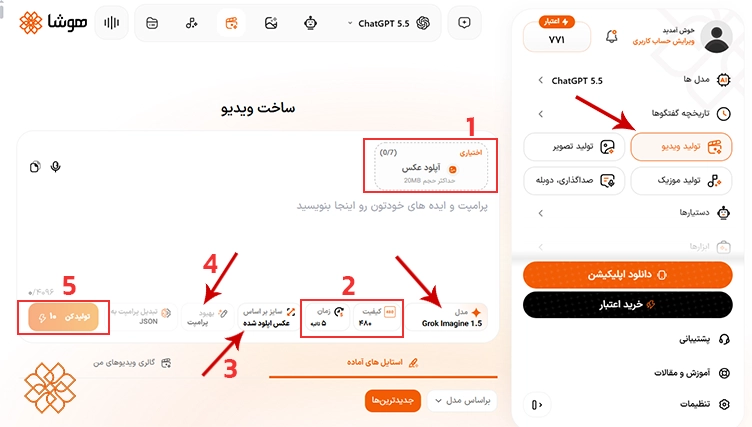
- در هوشا میتوانید علاوه بر پرامپت متنی، به عنوان ورودی آپلود عکس نیز انجام دهید.
- کیفیت و مدت زمان ویدیو را انتخاب کنید.
- سایز تصویر نیز بر اساس نیاز شما قابل تغییر است.
- همچنین میتوانید با استفاده از گزینه بهبود پرامپت، متن خود را به صورت خودکار بهبود دهید.
- در این تنظیمات، هر خروجی ۱۰ اعتبار مصرف میکند
نمونه ویدیوی تولید شده با Grok در هوشا
پرامپت وارد شده و نمونه کلیپ خروجی از گراک را در ادامه مشاهده کنید.
| Transform this old nostalgic family photo into a realistic cinematic memory scene. Keep the exact same two people, same facial identity, same age, same hairstyle, same clothing, same glasses on the woman, same embrace posture at the start, same house, same driveway, same red car, same white car, same background, same warm faded-photo atmosphere. Preserve the original old-photo realism: natural faded colors, very light film texture, slight softness, clean realistic daylight, authentic nostalgic family-photo feeling, warm emotional memory mood. Generate one continuous 10-second cinematic scene. CRITICAL CAMERA RULE: Use only ONE SINGLE FIXED SHOT from beginning to end. Do not cut. Do not zoom. Do not pan. Do not tilt. Do not reframe. Do not change angle. The camera must stay locked in the exact original composition for the entire scene. CRITICAL PERFORMANCE RULE: The couple starts in the same pose as the original photo, standing close together. They move naturally and gently. Subtle blinking, breathing, tiny body movement, soft smiles. The man speaks first. Then the woman speaks directly to the camera. Then both warmly hug each other. CRITICAL DIALOGUE RULE: Dialogue starts immediately at 0.0s. The MAN speaks first. The WOMAN speaks second. No overlapping speech. No repeated lines. Only the active speaker’s lips move. Scene structure inside the single fixed shot: Turn 1 (0.0–5.0s): The MAN looks warmly toward the camera with loving parental emotion. The WOMAN stays silent, smiling softly. The MAN says exactly: «اِمروز روزی بود کِه تو بِه دُنیا اومَدی وَ مَن و مادَرِت خُشحالتَرین آدَمهایِ این دُنیا هَستیم.» Speak exactly as written. Turn 2 (5.0–7.5s): The WOMAN turns her attention directly to the camera with a tender emotional smile. The MAN stays silent. The WOMAN says exactly: «خِیلی دوستِت دارَم عَزیزَم.» Speak exactly as written. Turn 3 (7.5–10.0s): No new dialogue. They both turn gently toward each other and warmly hug one another. The embrace feels soft, loving, parental, and sincere. End on an emotional nostalgic family-memory beat. Audio requirements: Spoken language must be Modern Iranian Persian with Tehrani accent only. Do NOT use Kurdish, Dari, Tajik, Arabic, Turkish, or Afghan accents. Use natural older male and older female Persian voices. The man’s voice should sound warm, fatherly, emotional, and sincere. The woman’s voice should sound loving, gentle, and maternal. Use clear lip-sync, natural pauses, breathing, and soft emotional delivery. Audio texture: warm nostalgic microphone tone, slight room ambience, subtle analog softness, clean dialogue, not distorted, not robotic. Visual requirements: Soft cinematic daylight, realistic acting, subtle eye movement, warm emotional atmosphere, very light natural film texture, minimal grain, clean image quality, no heavy blur, no aggressive film damage, no strong VHS effect, no excessive noise. Negative constraints: No subtitles. No text. No watermark. No logos. No face change. No clothing change. No extra people. No camera movement. No cuts. No mixed dialogue. No overlapping speech. No warped hands. No distorted mouth. No identity change. |
۲. تولید، ویرایش و ادامهدادن ویدیو با سیدنس (Seedance)
Seedance یکی از مدلهای هوش مصنوعی شرکت ByteDance برای تولید و ویرایش ویدیو است. این مدل برای تبدیل ایدههای متنی به ویدیو و ساخت صحنههای پیچیده با کمک ورودیهای مختلف مرجع طراحی شدهاند.
در نسخه Seedance ۲، علاوه بر متن و تصویر، میتوان از صدا و ویدیو نیز بهعنوان ورودی استفاده کرد؛ قابلیتی که کنترل بیشتری روی حرکت دوربین، ظاهر سوژه و فضای صحنه در اختیار کاربر قرار میدهد.
در نسخه Seedance ۲.۵، امکان تولید کلیپهای حداکثر ۳۰ ثانیهای در یک مرحله و ادامهدادن ویدیو در چند مرحله فراهم شده است. این ویژگی میتواند برای ساخت ویدیوهای داستانی کوتاه، محتوای تبلیغاتی و کلیپهای شبکههای اجتماعی کاربردی باشد.
نسخه رایگان Seedance چه امکاناتی دارد؟
ساخت ویدیو در Seedance نیاز به حداقل ۳۰۰ اعتبار دارد و اعتبار اولیه رایگان این پلتفرم برای تولید ویدیو کافی نیست. در نتیجه خرید اشتراک الزامی است. این مدل ۳ پلن متفاوت دارد. پلن Starter با ماهانه ۲۹.۹۰ دلار، پلن پریمیوم با ماهانه ۴۹.۹۰ دلار و پلن Advanced با ماهانه ۸۹.۹۰ در دسترس شما قرار میگیرد.
نحوه دسترسی به هوش مصنوعی Seedance
برای دسترسی به Seedance میتوانید به وب سایت https://www.seedance.ai/ مراجعه کنید. در زمان بررسی نیز، لینک اپلیکیشن مستقل و تأییدشدهای از سوی ByteDance برای دانلود سیدنس در منابع رسمی قرار نگرفته است.
آموزش ساخت ویدیو با سیدنس در هوشا
اگر میخواهید بدون جابهجایی بین چند سرویس، قابلیتهای این مدل را امتحان کنید، میتوانید از مدل سیدنس در بخش سرویس ویدیوی هوشا استفاده کنید. برای شروع، مدل Seedance را انتخاب کنید و ورودی موردنیاز را مطابق گزینههای نمایشدادهشده وارد کنید.
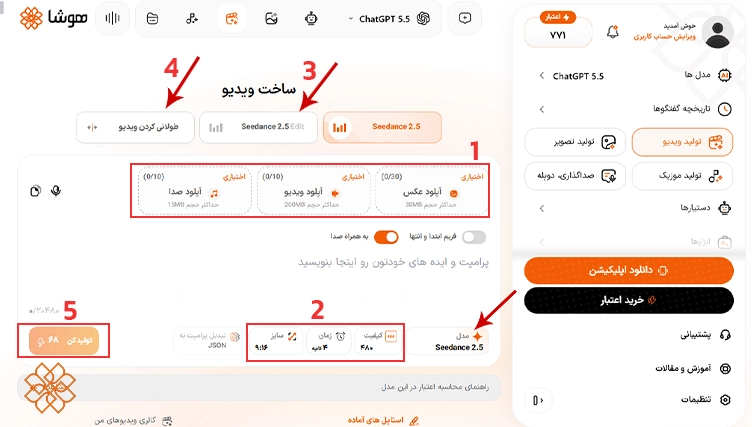
- در مدل سیدنس علاوه بر پرامپت متنی، میتوانید به عنوان ورودی عکس، ویدیو و صدا نیز آپلود کنید.
- کیفیت، مدت زمان و سایز ویدیو نیز قابل تغییر هستند.
- در بخش Edit میتوانید ویدیو اصلی را آپلود کنید و سپس ویرایش مورد نظرتان را از هوش مصنوعی بخواهید.
- بخش طولانی کردن ویدیو نیز مانند بخش ویرایش نیاز به آپلود ویدیو اصلی دارد تا خروجی نهایی با نظر شما ساخته شود.
- میزان اعتبار مصرفشده برای هر خروجی، ۶۸ است که با توجه به مدل انتخابی و نیاز شما میتواند متغیر باشد.
نمونه ویدیوی تولید شده با Seedance در هوشا
برای دیدن نتیجه ویدیو تولید شده در Seedance یک نمونه پرامپت و خروجی نهایی را برای شما آوردهایم.
پرامپت:
| SCENE CONTEXT A lone person in a charcoal overcoat is pinned behind a dark grey SUV on level P3 of an underground concrete car park at night while two masked gunmen advance from the entry ramp. The protagonist returns controlled pistol fire, moves one pillar closer to the stairwell exit, reloads in total stillness, and breaks cover again. Pure physical action, no dialogue. REFERENCE AND IDENTITY LOCK The person in the reference image is the single protagonist of this shot. Their face, head, hairstyle, hair colour, facial hair if present, skin tone, body proportions, height, build and overall physical identity are copied exactly from the reference image in every frame and every shot. Do not impose any predetermined age, height, body type, skin tone, ethnicity, hairstyle, hair colour, eye colour, facial hair, facial structure or other physical characteristics on the protagonist. All of these characteristics must come only from the uploaded reference image. The reference image is the source of truth for identity; only the clothing in the reference image is ignored — in this shot the protagonist wears the wardrobe described below. Their head stays bare and their face stays uncovered in every frame. Count of this protagonist in frame: one. THE PROTAGONIST — WARDROBE Charcoal grey heavy wool overcoat, knee length, unbuttoned, collar down; black fine-knit merino turtleneck; dark charcoal slim wool trousers; black leather lace-up boots with lugged soles; black leather gloves. In the right hand a black polymer compact 9mm pistol with a plain steel slide, held in both hands at compressed ready against the chest in frame one. Two spare magazines in the left coat pocket. THE PROTAGONIST — PERFORMANCE The protagonist runs on control: low centre of gravity, weight on the whole foot, every movement economical and slightly slower than the chaos around them. Objective in this shot: reach the stairwell exit alive; tactic: trade one burst of accurate fire for every two metres of ground. Their eyes do the work before the body does — hooded, steady, with slow deliberate blinks that turn into one short rapid blink-burst as the glass goes, then settle again; the gaze flicks between the ramp, the reflection in a parked car window and the exit door, landing on each target a beat before the head follows; catchlights wet and alive under the tubes. Breath is low and audible through the nose, one short exhale right before every commitment. Pain and fear register only as a locked jaw and a half-second of total stillness. When the slide locks back the protagonist does not flinch: stops, lets the silence sit for one full second with eyes on the reflection, reloads with hands that move before the face reacts, and only then shows a flicker of the mask cracking — a hard swallow and a single tight exhale through pursed lips — before moving again. Lips closed; count of spoken words: zero. THE ATTACKERS Attacker One: male, early thirties, about 180 cm, lean athletic build, black softshell jacket, black cargo trousers, black tactical gloves, black knit balaclava showing only the eyes, suppressed black MP5 submachine gun with a small red-dot sight held shouldered. Attacker Two: male, late thirties, about 190 cm, heavy build, black softshell jacket over a black low-profile plate carrier, black cargo trousers, black balaclava showing only the eyes, suppressed black MP5. Both advance down the drive lane from the ramp in a crouched two-man tactical walk, Attacker One leading screen-left, Attacker Two two metres behind and camera-right, both weapons pointed at the SUV. Their faces stay covered throughout. Count of attackers: two. LOCATION MAP Underground car park, level P3, night. Low grey concrete ceiling at about 2.4 m with exposed grey pipes and conduit; square concrete pillars every 7 m, each stencilled with a yellow “P3” bay number; a single drive lane running from the entry ramp in the background toward the camera; parking bays on both sides. Floor: sealed grey concrete, wet in patches with a thin oil sheen that mirrors the tubes. Camera faces the ramp. Background: the ramp, lit by one orange sodium emergency lamp, with a grey sedan parked in the bay closest to it. Midground screen-left: the dark grey SUV where the protagonist takes cover, rear end toward camera. Midground screen-right, 4 m from the SUV: pillar P3-15. Behind it, 4 m further screen-right: a steel stairwell door with a green exit sign. A white panel van is parked in the far background bay camera-right. Cool green-white fluorescent tubes run along the ceiling in every bay; the tube directly above the SUV flickers intermittently. Air carries fine dust and a thin haze from the gunfire. FIRST FRAME AND SPATIAL BLOCKING The first visible frame already contains the protagonist and both attackers in position; the geography is readable immediately. The protagonist crouches behind the rear quarter panel of the SUV, back against the rear passenger door, body facing screen-right toward the pillar and exit, head turned toward the ramp; the protagonist occupies the screen-left third, in the midground, 1.2 m from camera. Above them the SUV’s rear window is already bursting — granules of safety glass hang in the air in frame one. The two attackers are 12 m away in the background, in the drive lane, approaching. Their gaze lines and weapons are locked on the SUV. The protagonist’s eyes are on the rear window reflection, not on the camera. FORMAT MODE Controlled three-shot sequence, hard cuts only, real-time speed, one continuous event. Every cut preserves the same two attackers, the same geography, the same screen direction (ramp background, exit screen-right), the same lighting, the same wardrobe and the same prop states. OPTICS AND CAMERA Shot A, 0:00–0:05: 84° diagonal field of view, classic wide-angle lens character, handheld, lens at hip height, camera 1.2 m from the protagonist on the shadow side, slightly below eyeline; the protagonist holds the screen-left third, the drive lane and attackers read in the background to the right; foreground body presence looms larger than natural, environment visible to the frame edges, deep readable focus, straight pillar lines stay rectilinear. Operator breath and weight shift, a hard flinch-settle on the glass burst, organic human correction, shoulder-mounted mass. Hard cut. Shot B, 0:05–0:10: 47° diagonal field of view, standard normal lens character, handheld at chest height, tracking alongside the protagonist at walking pace from the shadow side as they cross from the SUV to the pillar, then settling as they stop; natural human-eye perspective, natural proportions, background readable. Hard cut. Shot C, 0:10–0:15: 29° diagonal field of view, short telephoto portrait lens character, camera 5 m away, low, placed screen-right of the pillar; close framing achieved through lens reach, not physical proximity; the protagonist’s face razor-sharp with the flickering tube above, the car park compressing softly behind into dissolved concrete and cool bokeh, subject popping clearly from the environment. Camera begins locked and pans with the protagonist when they break cover. Lens character is held within each shot; the lens changes only at the cuts. ACTION TIMING 0:00–0:02: Glass granules fall across the protagonist’s shoulders and coat. The protagonist drops lower, slides half a metre along the rear door, left glove flat on the wet concrete for balance, coat pooling. Suppressed bursts from the ramp clack past; two rounds spark and chip the pillar beyond and punch a dent into the SUV’s tailgate. 0:02–0:05: The protagonist rises to the rear corner of the SUV, pistol up, and fires two controlled pairs down the lane — four shots, muzzle rising and returning each time, four brass casings arcing right and ringing on the concrete. Attacker One drops behind the grey sedan out of sight. Attacker Two returns a burst and the protagonist snaps back behind the SUV. Hard cut. 0:05–0:08: The protagonist moves — three fast heavy strides from the SUV to pillar P3-15, coat flaring behind with real fabric delay, boots splashing a shallow puddle, pistol tracking the lane while moving. Rounds chip concrete off the pillar edge as the protagonist reaches it and puts their back to it. 0:08–0:10: Back against the pillar, the protagonist fires once more around the edge and the slide locks back empty. The protagonist stops completely. One second of stillness, eyes on the reflection in the sedan window. Then: right thumb drops the empty magazine, which clatters on the concrete; left hand pulls a fresh magazine from the coat pocket, seats it with a hard slap, thumb releases the slide with a snap. Hard cut. 0:10–0:13: Close on the protagonist’s face against the pillar under the flickering tube: a short exhale through the nose, one swallow, eyes flick to the exit door screen-right and come back to the lane; blink rate settles. Attacker Two advances in the background, softly out of focus, shifting to the protagonist’s original side of the pillar. 0:13–0:15: The protagonist steps out on the opposite side of the pillar from the one entered, fires two shots toward the ramp, and moves hard toward the stairwell door, coat trailing. Attacker Two ducks behind the white van. Final frame: the protagonist in full stride toward the door, face in profile, pistol up. PHYSICS Gravity, mass and friction on everything. The wool coat has weight: it swings late behind each step and settles after the protagonist stops. Boots grip and splash on wet concrete; weight transfers heel to toe with hip shift. The pistol has recoil: muzzle rises and returns, the slide cycles visibly, brass ejects camera-right in parabolic arcs and rings as it lands and rolls. The dropped magazine falls straight and clatters. Safety-glass granules fall as small cubes and crunch under boots. Bullet impacts throw concrete chips and dust from the pillar and leave visible marks that stay. Muzzle flash is a single-frame warm pulse that lights the nearest concrete and gloves. Haze drifts slowly in the tube light. Motion is real-time with natural 180-degree-shutter motion blur. LIGHTING Primary light: cool green-white fluorescent tubes overhead, hard top light with soft bounce back up from the wet floor; the tube above the SUV flickers intermittently and the tube above the pillar flickers in Shot C. Secondary: one orange sodium emergency lamp at the ramp, backlighting the attackers as silhouettes with rim light on their shoulders and weapons. Tertiary: muzzle flashes as brief warm pulses. The camera stays on the protagonist’s shadow side; the face is lit from above and from the floor bounce, with real eye-socket shadow, readable features and wet catchlights. Exposure is set for the tubes and the sodium lamp; the deep bays fall into dark grey shadow with the oil-sheen reflections carrying the floor. The only light sources are the tubes, the emergency lamp and the muzzle flashes. GRADE AND TEXTURE Kodak Vision3 500T look: cool green-cyan fluorescent base against the single warm sodium point, naturalistic contrast, real fine film grain, slight halation around the tubes and the muzzle flashes, true skin texture with pores, any natural facial hair present in the reference image, and sweat sheen, grounded physical cinema texture. Documentary-grade realism in every frame: natural skin, natural fabric, real light falloff. AUDIO No music, no score, no bgm — diegetic only. Ambient bed: low ventilation hum, fluorescent buzz, a slow water drip somewhere in the dark, distant traffic from the ramp. Named sounds: safety glass bursting and raining on the coat and concrete; suppressed MP5 bursts as tight mechanical clacks with the rounds snapping past and chipping concrete; the protagonist’s unsuppressed pistol shots loud and sharp with long concrete slap-back echo; brass ringing and rolling on the floor; boot splash and heavy steps; wool coat movement; the empty magazine clattering, the fresh magazine slapping home, the slide snapping forward; nose breaths and one hard swallow close in Shot C. Count of spoken words: zero. POSITIVE CONSTRAINTS Count of the protagonist in frame across all shots: one, with the exact face, hairstyle, body proportions and overall identity of the person in the reference image in every frame. Count of attackers: two, both masked, faces covered. Count of other people: zero. Count of hats, hoods, masks or eyewear on the protagonist: zero. Count of vehicles in the protagonist’s immediate area: one SUV. Count of cuts: two, both hard cuts. Count of lens characters: one per shot. Count of legible words or on-screen text, subtitles or captions: zero. Count of slow-motion moments: zero. Screen direction holds: ramp and attackers in the background, stairwell exit screen-right, in every shot. Prop state holds: pistol in the protagonist’s right hand throughout, both gloves on, coat unbuttoned. Sharp clarity, natural colours, stable picture. |
۳. گوگل جمنای امنی (Google Gemini Omni)؛ هوش مصنوعی ساخت ویدیو با دیالوگ فارسی
Google Gemini Omni مدل هوش مصنوعی گوگل برای تولید و ویرایش ویدیو است. یکی از ویژگیهای مهم این مدل، پشتیبانی از چند مرجع به عنوان ورودی است؛ یعنی میتوانید از متن، تصویر و ویدیو برای فرایند تولید استفاده کنید.
از قابلیتهای آن نیز میتوان به امکان تغییر جزئیات صحنه و طولانی کردن ویدیو اشاره کرد. مزیتهای اصلی Omni، تولید ویدیوهای ۱۰ ثانیهای، تولید صدا و درک پرامپت و دیالوگ فارسی، تبدیل عکس به ویدیو، ویرایش ویدیو و … هستند.
نسخه رایگان گوگل امنی چه امکاناتی دارد؟ + لینک دانلود
دسترسی رایگان به تولید ویدیو با Omni در اپلیکیشن و وبسایت جمنای به آدرس https://gemini.google.com/app وجود ندارد و برای استفاده از این مدل باید حتما اشتراک تهیه کنید. امکانات، سقف استفاده و دسترسی به مدلها نیز ممکن است با توجه به طرح اشتراک و منطقه جغرافیایی تغییر کند. اشتراک ماهانه Google AI شامل پلن پلاس با قیمت ۴.۹۹ دلار، پرو با قیمت ۱۹.۹۹ دلار و اولترا با قیمت ۹۹.۹۹ دلار است.
برای استفاده از اپلیکیشن رسمی Gemini میتوانید از لینکهای زیر وارد فروشگاه مربوطه شوید:
آموزش تولید ویدیو با Google Gemini Omni در هوشا
برای استفاده از مدل Google Omni در سرویس ویدیوی هوشا، میتوانید آن را از فهرست مدلها انتخاب کنید و تنظیمات تولید را بر اساس گزینههای موجود مشخص کنید. پس از وارد کردن پرامپت یا بارگذاری ورودی مورد نیاز، «تولید کن» را بزنید تا ویدیوی خروجی ساخته شود.
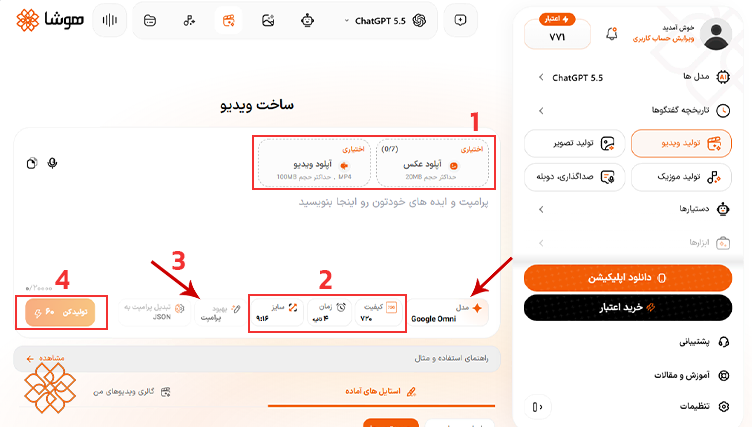
- در مدل Omni میتوانید علاوه بر پرامپت متنی، به عنوان ورودی آپلود عکس و ویدیو نیز انجام دهید.
- کیفیت، مدت زمان و سایز ویدیو را میتوانید انتخاب کرده و تغییر دهید.
- همچنین میتوانید با استفاده از گزینه بهبود پرامپت، متن پرامپت را به صورت خودکار بهبود دهید.
- میزان اعتبار مصرفشده برای هر خروجی بسته به تنظیمات شما ۶۰ است.
نمونه ویدیوی تولید شده با گوگل امنی در هوشا
برای دیدن نمونه خروجی مدل Google Omni، پرامپت زیر را در هوشا اجرا میکنیم.
پرامپت:
| Create a 10-second, 9:16 vertical, ultra-realistic cinematic ad reel in one continuous smooth shot. Reza sits relaxed at a table on the rooftop of an upscale luxury café in Tehran called “Café Vienna.” Keep his appearance, hair, beard, outfit, and accessories exactly as defined by his character — do not change his look. He looks directly into the camera with calm confidence and a warm, friendly expression, speaking to the viewer. The camera holds a smooth, steady medium shot on him (locked-off / gentle slow push-in, advertising-reel style, no shake), framing his face and upper body. Shallow depth of field, 35mm look — the rooftop behind him stays slightly blurred but recognizable. Setting: a stylish rooftop café terrace high above Tehran — modern lounge seating, warm ambient lighting, plants and soft décor, the Tehran skyline and distant Alborz mountains softly blurred in the background. Warm late-afternoon golden-hour light, soft highlights, premium cozy urban palette. A few people relaxing at other tables in the soft background. Calm, classy, lively-but-controlled atmosphere. He speaks directly to camera in a confident, warm, slightly proud tone, in Persian, with accurate lip-sync: “هیچ هوش مصنوعی نمیتونه وایب تهران رو به این قشنگی دربیاره. این چیزیه که فقط از پس هوشا برمیاد. با عکس خودت امتحانش کن.” Action beats synced to his words: – On “وایب تهران” he gives a small confident gesture toward the city view behind him. – On “هوشا” he looks straight into the lens with a proud, knowing smile. – On the final sentence “با عکس خودت امتحانش کن” he points lightly toward the camera, inviting the viewer. Style: realistic, cinematic, modern Tehran luxury lifestyle vlog — premium, classy, Instagram-ready. Natural skin texture, realistic fabric, natural subtle movement. Not cartoonish, not fantasy, not over-stylized. |
۴. وئو (Veo)؛ بهترین هوش مصنوعی برای ساخت ویدیو سینمایی با صدا
Veo نیز مدل تولید ویدیوی هوش مصنوعی گوگل است که برای ساخت کلیپهای واقعگرایانه، ویدیوهای سینمایی و همراه با صدا طراحی شد. اما دسترسی آن در تاریخ ۲۲ اکتبر ۲۰۲۶ بسته شد و برای استفاده از سرویس ویدیو گوگل باید از Omni Flash یا دیگر مدلها استفاده کنید.
راهنمای کار با وئو در هوشا
برای استفاده از Veo در هوشا، وارد بخش سرویس ویدیو شوید و این مدل را از فهرست مدلهای موجود انتخاب کنید. از کاربردهای مهم این مدل میتوان به تبدیل تصاویر ثابت به ویدیوهای متحرک اشاره کرد.
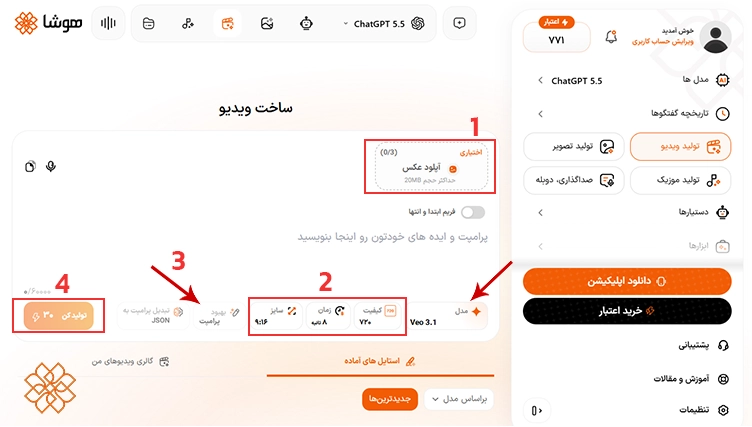
- در مدل وئو میتوانید علاوه بر پرامپت متنی، به عنوان ورودی آپلود عکس نیز انجام دهید.
- کیفیت، سایز و مدت زمان ویدیو را میتوانید تغییر دهید.
- همچنین میتوانید برای افزایش کیفیت و دقت پرامپت خود از گزینه «بهبود پرامپت» استفاده کنید.
- میزان اعتبار مصرفشده برای هر خروجی بسته به تنظیمات شما ۳۰ است.
نمونه ویدیوی تولید شده با Veo در هوشا
برای بررسی عملکرد Veo، پرامپت متنی زیر را برای این مدل ارسال میکنیم.
پرامپت:
| { “description”: “Cinematic ultra-close-up of a Dior perfume bottle resting delicately on a polished marble pedestal in an empty, misty hall. Dew-like droplets glisten on the glass. The bottle subtly shimmers-then the perfume spritzes in slow motion. From the mist, silk fabrics flow outward, forming ethereal dresses that float mid-air. Petals blossom and spiral upward, creating an enchanted garden suspended in time. Walls dissolve into open sky. A chandelier of stars assembles above. A luminous figure, representing elegance, dances through the floating petals as fragrance waves ripple through the scene. The entire space transforms into an otherworldly Dior dreamscape. No text.”, “style”: “cinematic, elegant magical realism”, “camera”: “starts with an intimate macro shot of the bottle surface and droplets, slowly dollies back while orbiting, then cranes upward to reveal the full ethereal transformation in sweeping, graceful motion”, “lighting”: “soft morning light transitioning into golden glow, ending with a moonlit sparkle across the scene”, “environment”: “quiet marble hall transforms into an infinite floating garden above the clouds”, “elements”: [ “Dior perfume bottle (logo subtly visible, glass texture detailed)”, “slow-motion perfume spritz with shimmering particles”, “silk fabrics flowing from mist, creating mid-air couture dresses”, “petals blooming and swirling upward”, “walls dissolving into sky”, “chandelier of stars forming piece by piece”, “luminous figure dancing through floating elements”, “light waves symbolizing fragrance spreading gracefully”, “reflections and refractions of light on marble and glass”, “a seamless blend of nature and luxury aesthetics” ], “motion”: “fluid, graceful chain reaction from the perfume spray-silks and petals animate in elegant slow-motion mixed with time-lapse as the world transforms around the bottle”, “ending”: “Dior perfume bottle in foreground, the surreal Dior dreamscape floating behind it, softly glowing”, “text”: “none”, “keywords”: [ “Dior”, “perfume transformation”, “ethereal elegance”, “magical realism”, “luxury fashion”, “floating garden”, “silk and petals”, “dreamscape”, “cinematic”, “no text” ] } |
۵. کلینگ (Kling)؛ بهترین هوش مصنوعی برای ساخت ویدیو واقعگرایانه
هوش مصنوعی Kling محصول شرکت Kuaishou است که برای تولید و ویرایش ویدیو با استفاده از متن و تصویر طراحی شده است. یکی از قابلیتهای مهم این ابزار، انتقال حرکت و حالت چهره از ویدیو مرجع به عکس آپلود شده شماست. در نسخههای جدیدتر کلینگ، قابلیتهایی مانند تولید صدای هماهنگ با تصویر، ساخت ویدیوهای چندبخشی و افزایش مدت ویدیو نیز ارائه شدهاند. امکانات دقیق به مدل انتخابشده بستگی دارد.
نسخه رایگان Kling چه امکاناتی دارد؟
کلینگ در زمان نگارش این مقاله (۴ آبان ۱۴۰۵) پلن رایگان دارد و کاربران میتوانند با ۶۶ اعتبار، قابلیتهای تولید تصویر و ویدیو را امتحان کنند. تعداد اعتبارها، مدلهای در دسترس و محدودیت کیفیت خروجی ممکن است تغییر کند. قیمت اشتراکها نیز بر اساس پلن و شرایط خرید متفاوت است؛ اما پلنهای ۳۰ روزه از ۹.۸ دلار و پلنهای ۱۸۰ روزه از ۷۰۰ دلار شروع میشوند.
دسترسی به هوش مصنوعی کلینگ
برای استفاده از وبسایت کلینگ به آدرس https://kling.ai/ مراجعه کنید و اپلیکیشن رسمی Kling از لینکهای زیر قابل دانلود است:
آموزش ساخت ویدیو با کلینگ در هوشا
برای استفاده از مدل Kling در سرویس ویدیوی هوشا، آن را از فهرست مدلها انتخاب کنید، ورودی مورد نیاز را وارد کرده و پس از مشخص کردن تنظیمات موجود، روی «تولید کن» بزنید تا ویدیوی شما ساخته شود.
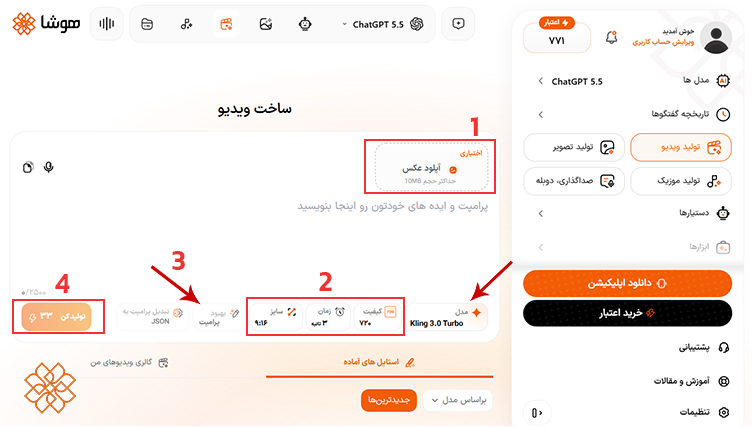
- در مدل Kling میتوانید علاوه بر پرامپت متنی، به عنوان ورودی عکس نیز آپلود کنید.
- کیفیت، مدت زمان و سایز ویدیو نیز قابل تغییر است.
- میتوانید برای افزایش کیفیت و دقت پرامپت از گزینه «بهبود پرامپت» استفاده نمایید.
- میزان اعتبار مصرفشده برای هر خروجی بسته به تنظیمات شما ۳۳ است.
نمونه ویدیوی تولید شده با Kling در هوشا
برای بررسی عملکرد Kling در تبدیل متن به ویدیو، پرامپت زیر را در هوشا اجرا میکنیم.
پرامپت:
| Animate and restore this old family portrait into a warm, heartfelt 10s cinematic clip that brings it to life with enhanced high quality. CRITICAL CONSISTENCY: keep the SAME two elderly people, SAME faces, SAME identities — SAME older man (seated, balding with short side hair, white short-sleeve shirt, dark patterned tie, warm smile) and SAME older woman (standing behind, short curly brown hair, glasses, cream striped mock-neck top, hand resting on his shoulder) — faces, features, glasses and clothing must stay 100% identical, no morphing, no distortion, natural realistic human motion only. RESTORATION: gently upscale and sharpen the soft vintage photo, reduce grain and blur, restore natural skin tones and fine detail while keeping the authentic original look. Photoreal, cinematic, 8K clarity, soft studio lighting, shallow depth of field. [0-3s] SHOT 1 — Start exactly on the frame: gentle slow push-in, both subtly come alive — natural breathing, eyes blink softly, warm genuine smiles grow on both faces, slight head movement. Tender, alive, photoreal. [3-6s] SHOT 2 — They both start to laugh warmly and naturally, eyes crinkling with real joy, the woman glances down warmly at the man, shared happy expression, shoulders relaxing. Soft studio light, authentic candid emotion. [6-9s] SHOT 3 — She leans down and they share a warm affectionate hug, she wraps her arms gently around him from behind, he raises a hand to hold hers, both still smiling, eyes soft and loving. Gentle heartfelt family moment, camera slow subtle push-in. [9-10s] SHOT 4 — They settle from the hug looking content and happy toward the camera, soft warm glow, a final tender smile, slow push-in, clean gentle fade. Color: warm natural skin tones, soft restored studio colors, gentle blue marbled backdrop, cozy highlights. Lighting: soft even studio key, warm gentle fill, no harsh shadows. Lens: 50-85mm, soft creamy bokeh, gentle glow. AUDIO: warm and emotional — soft heartfelt piano, gentle warm strings, subtle nostalgic ambience, light shimmer, tender final note. Mood: loving, nostalgic, joyful, intimate, heartwarming. Style: photoreal, restored high quality, flawless render, stable identical faces, natural human emotion, authentic family moment, no text artifacts. |
۶. رانوی (Runway)؛ بهترین برای ساخت ویدیوهای تبلیغاتی و خلاقانه
هوش مصنوعی Runway ابزاری برای تولید و ویرایش ویدیو است که امکان ساخت کلیپ از متن و تصاویر را دارد. از مزیتهای مهم آن میتوان به خلاقانه و حرفهای بودن اشاره کرد، همچنین این مدل برای تولید ویدیوهای تبلیغاتی مناسب است.
نسخه رایگان ران وی چه امکاناتی دارد؟
Runway یک پلن رایگان با ۱۲۵ اعتبار اولیه دارد که پس از مصرف، تمدید نمیشود. در پلن رایگان به مدلهای مختلفی برای ساخت ویدیو دسترسی خواهید داشت.
قیمت پلن Standard ماهانه ۱۵ دلار، پلن Pro ماهانه ۳۵ دلار و پلن Max ماهانه ۹۵ دلار است. پلن سالانه با پرداخت ماهانه ۲۰ درصد کمتر است و هزینه تولید هر ویدیو نیز به مدل و مدت آن بستگی دارد.
دانلود هوش مصنوعی ساخت ویدیو Runway
برای استفاده از ران وی از وبسایت به آدرس https://runway.com/ و برای دانلود اپلیکیشن رسمی میتوانید از لینکهای زیر اقدام نمایید:
راهنمای کار با Runway در هوشا
برای استفاده از مدل Runway در سرویس ویدیوی هوشا، آن را از فهرست مدلها انتخاب کنید، و تنظیمات موجود را مشخص کنید. سپس روی «تولید کن» بزنید تا ویدیو ساخته شود.
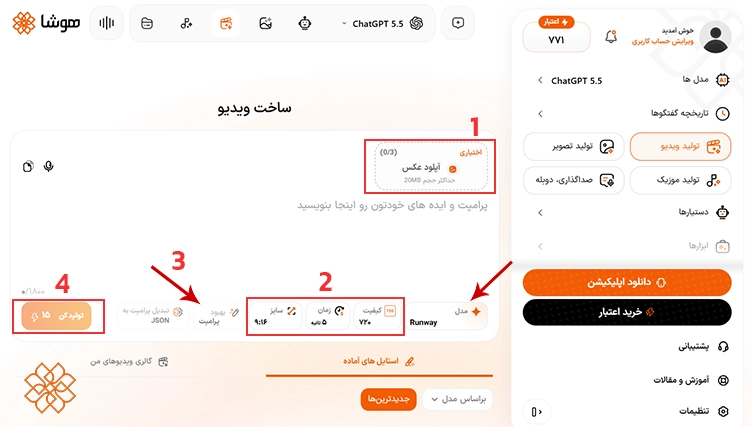
- در مدل Runway میتوانید علاوه بر پرامپت متنی، عکس نیز به عنوان ورودی آپلود کنید.
- کیفیت، مدت زمان و سایز ویدیو نیز قابل تنظیم و تغییر است.
- میتوانید برای افزایش کیفیت و دقت پرامپت از گزینه «بهبود پرامپت» استفاده نمایید.
- میزان اعتبار مصرفشده برای هر خروجی به تنظیماتی که انجام میدهید بستگی دارد که در اینجا ۱۵ است.
نمونه ویدیوی تولید شده با ران وی در هوشا
برای بررسی عملکرد Runway در تبدیل متن به ویدیو، پرامپت زیر را در هوشا اجرا میکنیم.
پرامپت:
| { “description”: “8-second photorealistic cinematic video of a Suntis Mango juice can opening with a tropical burst of energy, with floating mango cubes spinning gently around it in mid-air.”, “style”: “photorealistic cinematic, bright tropical palette with orange, yellow, and teal highlights”, “camera”: “dramatic low-angle push-in (0-3s), smooth upward orbit to overhead (4-8s)”, “lighting”: “warm golden sunlight with tropical reflections, soft rim light emphasizing the can condensation”, “room”: “minimal glossy surface with blurred tropical background glow (palm leaves and sunlight bokeh)”, “elements”: [ “teal and yellow Suntis mango juice can”, “juice splash forming around the can”, “floating mango cubes spinning and glowing with juice droplets”, “tropical mist and condensation forming on the can”, “light reflections emphasizing the fresh, juicy texture” ], “motion”: “0-2s: can opens with juicy fizz and mango aroma burst. 2-5s: mango cubes rise and orbit slowly, juice splash forming around them. 5-7s: camera moves upward as cubes swirl gracefully. 7-8s: everything settles with cubes floating and condensation glistening.”, “ending”: “the Suntis Mango can stands centered, surrounded by softly glowing mango cubes and golden droplets in slow motion”, “text”: “none”, “keywords”: [ “8 seconds”, “16:9”, “Suntis Mango cinematic”, “tropical burst”, “floating mango cubes”, “juice splash”, “warm sunlight”, “slow motion”, “photorealistic” ] } |
۷. جنجوتسو (Genjutsu)؛ بهترین هوش مصنوعی برای ادیت ویدیو و انتقال حرکت به شخصیت جدید
با هوش مصنوعی Genjutsu میتوانید ویدیوی مرجع و تصاویر مورد نظر خود را آپلود کنید. سپس افراد و اشیاء از تصاویر در ویدیو مرجع جایگزین شوند و حرکت و حالت چهره و صدای اصلی ویدیو حفظ شود. دو قابلیت اصلی جنجوتسو، Motion Transfer برای انتقال حرکت و Object Swap برای جایگزینی سوژه یا اشیا است. بنابراین، کاربرد اصلی Genjutsu بازسازی و تغییر ویدیوهای موجود است، نه تولید ویدیو صرفاً از یک متن.
نسخه رایگان جنجوتسو چه امکاناتی دارد؟
Genjutsu در وبسایت https://genjutsu-ai.org/ رایگان نیست و برای ساخت ویدیو اول باید ۹.۹۰ دلار بپردازید. Plus Pack با قیمت ۲۴.۹۰ دلار و Batch Pack با قیمت ۳۹.۹۰ دلار در زمان نگارش این مقاله در دسترس هستند. اپلیکیشن رسمی اندروید یا آیفون برای جنجوتسو ارائه نشده است.
آموزش ساخت و ادیت ویدیو با Genjutsu در هوشا
برای استفاده از مدل جنجوتسو در سرویس ویدیوی هوشا، آن را از فهرست مدلها انتخاب کنید و ورودیها و تنظیمات موجود را مشخص کنید.
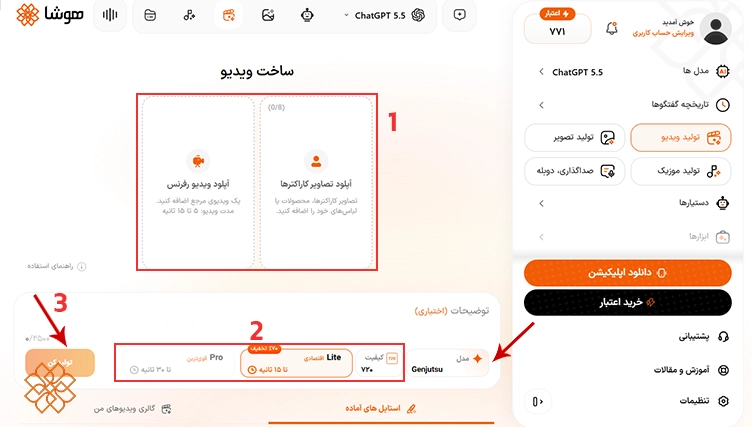
- در مدل Genjutsu میتوانید علاوه بر پرامپت متنی، عکس کاراکتر و ویدیو رفرنس را آپلود کنید.
- کیفیت و مدت زمان (در دو نوع Lite و Pro) نیز قابل تنظیم است.
- میزان اعتبار مصرفشده برای هر خروجی بسته به کیفیت است که انتخاب میکنید.
نمونه ویدیوی تولید شده با جنجوتسو در هوشا
برای بررسی عملکرد Genjutsu، یک ویدیوی مرجع و تصویر سوژه را مطابق ورودیهای موردنیاز مدل وارد میکنیم و تغییر موردنظر را توضیح میدهیم.
پرامپت:
| Replace the original character in the reference video completely with the provided character reference. Preserve the original video’s exact choreography, body movements, gestures, poses, timing, facial expressions, camera movement, framing, perspective, composition, environment, lighting, shadows, depth of field, and overall visual style. The replacement character must perform the exact same actions and movements as the original character, with accurate body tracking and natural motion throughout the entire shot. Use the exact clothing and outfit design from the original character in the reference video, including all garment types, materials, colors, textures, patterns, proportions, folds, and accessories — but completely remove the hat/headwear. The character must be naturally bareheaded, with the provided character’s original hairstyle and head appearance clearly visible. Preserve the provided character’s identity, facial structure, hairstyle, skin texture, body proportions, and recognizable features. Do not alter or redesign the character’s face. The clothing must remain perfectly aligned with the character’s body during movement, with realistic fabric deformation, folds, physics, and natural interaction with the body. Do not change the background, environment, props, camera angle, lens perspective, lighting setup, color grading, or cinematography of the reference video. The final result should look like the provided character was actually present in the original video from the beginning, with seamless integration, consistent lighting, realistic shadows, accurate occlusion, stable facial identity, and zero visual artifacts. Strict constraints: no hat, no headwear, no character morphing, no identity drift, no outfit redesign, no extra accessories, no additional characters, no background changes, no camera changes, no unwanted objects, no flickering, no warping, no distorted hands or face. |
مقایسه انواع بهترین هوش مصنوعی برای ساخت ویدیو پولی و رایگان
اگر میپرسید «بهترین هوش مصنوعی برای ساخت ویدیو چیه؟» در جدول زیر مقایسهای کلی برای انتخاب راحتتر شما انجام دادهایم. در این جدول ۷ ابزار موجود در سایت هوش مصنوعی فارسی هوشا برای تولید ویدیو بررسی شدهاند.
| مدل هوش مصنوعی | نوع ورودی در هوشا | مدت خروجی | وضوح واقعی | تولید صدا | اعتبار مصرفی | کاربرد مناسب | پشتیبانی از پرامپت فارسی | پشتیبانی از مکالمه فارسی |
| Grok | متن، عکس و صدا | ۱۵ ثانیه | ۱۰۸۰ | ✅ | حداکثر ۷۵ اعتبار | تولید ویدیو واقعگرایانه یا دیالوگ فارسی | ✅ | ✅ |
| Seedance | متن، ویدیو، عکس و صدا | ۳۰ ثانیه | ۱۰۸۰ | ✅ | حداکثر ۲۸۲۰ اعتبار | تولید ویدیو سینمایی،حفظ صحنه و چهره | ✅ | ✅ |
| Google Omni | متن، عکس، ویدیو و صدا | ۱۰ ثانیه | ۴K | ✅ | حداکثر ۱۳۰ اعتبار | درک بهتر صحنه و قابلیت جایگزینی اشیاء و افراد در ویدیو | ✅ | ✅ |
| Veo | متن، عکس و صدا | ۸ ثانیه | ۷۲۰ | ✅ | حداکثر ۳۰ اعتبار | متحرکسازی عکس با توضیح متنی، تولید ویدیو سینمایی با صدا | ✅ | ✅ |
| Kling | متن، عکس، صدا و در برخی ورژنها ویدیو | ۵ تا ۱۵ ثانیه | ۱۰۸۰ | در برخی ورژنها دارد و در برخی نه | بین ۸۰ تا ۲۱۰ اعتبار بسته به ورژن انتخابی | انیمیشنسازی و تولید ویدیوهای وایرال | ❌ | ❌ |
| Runway | متن، عکس و صدا | ۵ ثانیه | ۱۰۸۰ | ❌ | حداکثر ۳۰ اعتبار | تولید ویدیوهای تبلیغاتی و خلاقانه | ✅ | ❌ |
| Genjutsu | متن، عکس و ویدیو | ۳۰ ثانیه | ۱۰۸۰ | ✅ | ۷۰ تا ۲۲۰ اعتبار | جایگزینی افراد و اشیا با عکسهای آپلود شده | ✅ | ✅ |
جمعبندی
در مجموع انتخاب بهترین هوش مصنوعی برای ساخت ویدیو به نیاز، کیفیت خروجی و بودجه شما بستگی دارد. در این مقاله ۷ ابزار هوش مصنوعی را بررسی کردیم تا بتوانید با مقایسه قابلیتها و نمونه خروجی آنها، گزینه مناسب خود را انتخاب کنید.
با استفاده از چت جی پی تی رایگان پلتفرم هوشا نیز میتوانید پرامپت مورد نیاز خود را به صورت رایگان دریافت نمایید. همچنین بدون نیاز به VPN و با امکان پرداخت ریالی به مدلهای مختلف تولید ویدیو و سایر ابزارهای هوش مصنوعی در یک پلتفرم فارسی دسترسی دارید. حالا اگر میخواهید بدون درگیری با چند سایت مختلف، مدلهای ویدیویی هوشا را امتحان کنید، میتوانید از سرویس تولید ویدیو شروع کنید.
نویسنده: حنانه برزگر
۱. بهترین هوش مصنوعی برای ساخت ویدیو چیه؟
این مورد به نوع پروژه شما بستگی دارد. اگر به دنبال بهترین هوش مصنوعی تبدیل متن به ویدیو هستید، مدلهایی مثل Veo و Seedance را بررسی کنید. اگر ویدیوهای واقعی با دیالوگ فارسی میخواهید مدل Grok گزینه مناسبی است.
۲. ارزانترین مدل هوش مصنوعی برای تولید ویدیو کدام است؟
در زمان نگارش این مقاله، ارزانترین مدل هوش مصنوعی موجود در هوشا Grok است. کیفیت خروجی ۴۸۰ و طول ویدیو باید روی ۳ ثانیه تنظیم شود تا در هر تولید ویدیو تنها ۶ اعتبار مصرف کنید.
۳. با کدام مدل هوش مصنوعی میتوان ویدیو به زبان فارسی تولید کرد؟
مدلهایی مانند Google Omni، Grok و Veo را میتوان برای تولید ویدیو با پرامپت و دیالوگ فارسی بررسی کرد.
۴. چگونه از هوش مصنوعی ساخت ویدیو هوشا استفاده کنیم؟
با ورود به هوشا و ساخت و شارژ اکانت، مدل موردنظر را در سرویس تولید ویدیو انتخاب کنید. سپس پرامپت یا فایل ورودی را وارد کرده و تنظیمات را مشخص کنید. پس از بررسی میزان اعتبار مصرفی، گزینه «تولید کن» را بزنید و خروجی را دریافت نمایید.
۵. بهترین هوش مصنوعی برای ساخت ویدیو از زبان فارسی پشتیبانی میکند؟
پشتیبانی از پرامپت فارسی به مدل و نوع درخواست بستگی دارد. مدلهای Google Omni، Grok، Veo، Seedance و Runway از زبان فارسی برای نوشتن پرامپت متنی پشتیبانی میکنند.
۶. بهترین هوش مصنوعی برای ساخت ویدیو رایگان کدام است؟
یک مدل را نمیتوان بدون مقایسه خروجیها بهعنوان بهترین گزینه رایگان معرفی کرد. تعداد اعتبار رایگان، کیفیت و مدت ویدیو و محدودیتهای هر مدل را کنار هم بررسی کنید تا گزینه مناسب نیازتان را پیدا کنید.
۷. آیا هوش مصنوعی میتواند از روی عکس ویدیو بسازد؟
بله؛ مدلهای Kling و Runway میتوانند با دریافت یک عکس، حرکت دوربین، سوژه یا اجزای تصویر را متحرک کنند. نتیجه به مدل انتخابی، کیفیت عکس و پرامپت بستگی دارد.
 بهترین هوش مصنوعی برای ساخت ویدیو؛ مقایسه با تست عملی ۷ ابزار برتر
 ادیت ویدیو با هوش مصنوعی؛ آموزش ۶ تغییر کاربردی با پرامپت آماده
 ساخت موشن گرافیک با هوش مصنوعی؛ آموزش گامبهگام با ۴ نمونه واقعی
 ساخت موزیک ویدیو با هوش مصنوعی؛ آموزش تصویری در ۷ گام با مثال واقعی
 ساخت لوگو موشن با هوش مصنوعی؛ آموزش تصویری در ۶ گام با ویدیو خروجی