
اگر میخواهید ببینید چهرهتان از کودکی تا پیری چگونه تغییر میکند، در این آموزش با استفاده از یک عکس مرجع، ابتدا یک تصویر ۹ قابی از ۱ تا ۹۹ سالگی میسازیم و سپس آن را به یک ویدیوی ۱۰ثانیهای تغییر سن تبدیل میکنیم. پرامپت آماده برای هر دو مرحله در اختیار شماست و در ادامه، خروجی واقعی این پرامپتها را نیز بررسی میکنیم تا بتوانید نتیجه را مقایسه کنید.
تغییر چهره از کودکی تا پیری با هوش مصنوعی
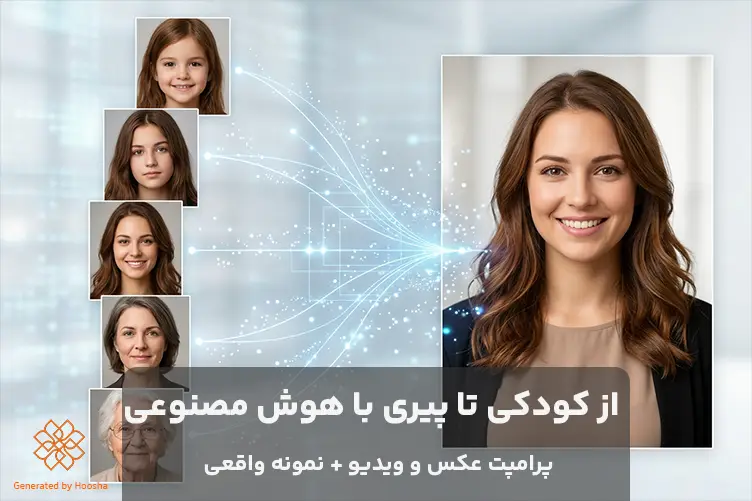
از کودکی تا پیری با هوش مصنوعی یکی از ترندهای تولید محتوای تصویری است که در آن، تصویر یک فرد در سنین مختلف بازسازی میشود. برای مثال، میتوان با یک عکس امروزی، تصاویری از همان فرد در دوران نوزادی، کودکی، نوجوانی، جوانی، میانسالی و سالمندی ساخت و ویژگیهای اصلی چهره و هویت او را حفظ کرد.
همچنین میتوان تصاویر را به یک کلیپ گذر سن (Age Progression Video) تبدیل کرد تا روند تغییر چهره بهصورت تدریجی نمایش داده شود. برای این کار، نیازی به مهارتهای حرفهای گرافیکی یا تدوین پیچیده تصویر و ویدیو نیست و ابزارهای هوش مصنوعی میتوانند این فرایند را ساده کنند.
پرامپت ویدیو بچگی و بزرگسالی
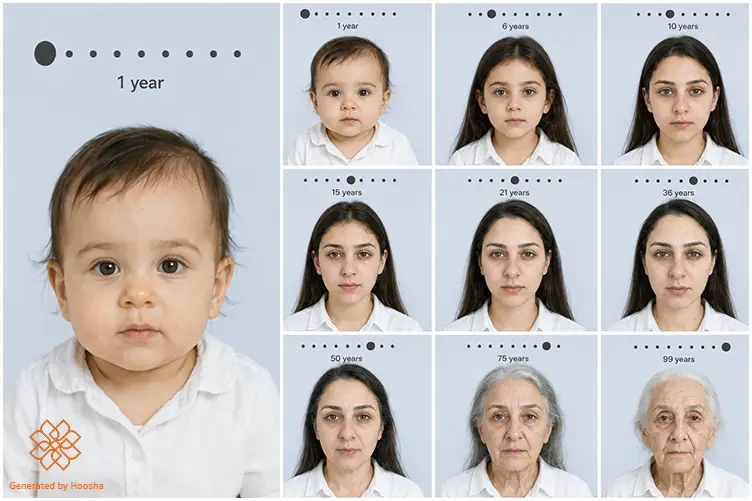
با استفاده از این پرامپت میتوانید یک تصویر ۹ قابی از ۱ تا ۹۹ سالگی از تصویر مرجع بسازید.
| Edit the uploaded photograph into a nine-panel photographic age-progression storyboard: a clean 3×3 grid of nine separate studio portraits of the SAME person, read left to right, top to bottom. Every panel is an identical head-and-shoulders portrait bust — head centred, same head size, same eye-line height, square-on camera at eye level, 85mm portrait lens look, subject facing the lens with a calm neutral closed-lip expression. Flat light grayish-blue seamless background, smooth and untextured, identical in all nine. The subject wears the same simple loosely fitted white cotton button-up shirt with an open collar in all nine panels, cut identically and scaled to the body. Soft even diffuse studio light from a large frontal octabox with fill on both sides, near-shadowless 1.5:1 ratio, smooth falloff, small catchlights in both eyes, skin texture clearly readable. CHANGE — age only, panel by panel: 1) age 1: infant, large round head, full soft cheeks, wide eyes set low on the face, tiny snub nose, short wispy fine hair, plump seamless skin, short soft neck. 2) age 6: young child, rounded face, small neat features, bright clear skin, fine soft hair, open trusting gaze. 3) age 10: pre-teen, face beginning to lengthen, features settling toward adult proportion, firm clear skin, tidy simple hair. 4) age 15: adolescent, jaw and nose reaching adult size, cheeks slimming, fresh young skin with a faint sheen, simple natural hairstyle. 5) age 21: young adult at full bone structure, taut firm skin, defined jawline, thick healthy hair. 6) age 36: mature adult, faint fine lines at the outer eye corners, one soft crease across the forehead, slightly fuller face, settled mature skin. 7) age 50: midlife, defined nasolabial folds, softening jaw and early neck slackening, fine lines around eyes and mouth, scattered silver strands at the temples. 8) age 75: elderly, deep lines across the forehead and around the eyes and mouth, thin crepe-textured skin with scattered age spots, hollowing cheeks, slightly hooded eyelids, thinning mostly white hair. 9) age 99: very elderly, deeply etched network of lines, thin translucent papery skin, sunken temples and cheeks, heavily hooded eyelids, sparse fine white hair, slender frail neck, faint pale ring at the outer edge of the iris. PRESERVE EXACTLY across all nine panels: the same real person — identical eye colour and iris pattern, eye shape and spacing, brow shape, nose bridge and tip, philtrum, lip shape and proportion, chin and jaw geometry, ear shape, face width-to-height ratio, hairline shape, natural hair colour before greying, skin tone and undertone, and the sex and ethnic features of the person in the reference. Every mole, freckle and birthmark stays in its same relative place, scaled to the face. Same background colour, same shirt, same lighting, same framing, same colour grade in every panel. GRAPHICS, identical placement in every panel: centred across the top, a horizontal track of small evenly spaced dark gray dots spanning most of the panel width, with one larger solid dark gray dot resting on the track — far left on panel 1, advancing one step per panel, exact centre on panel 5, far right end on panel 9. Directly beneath the track, centred, the age in a clean light-weight dark gray sans-serif: “1 year” on panel 1, then “6 years”, “10 years”, “15 years”, “21 years”, “36 years”, “50 years”, “75 years”, “99 years”. These nine labels are the only words in the image. Thin uniform white gutters between panels, equal outer margins. Palette: 60% light grayish-blue background, 30% soft off-white shirt and skin highlights, 10% dark charcoal-gray graphics. Photorealistic modern digital studio portrait capture, crisp natural detail, minimal fine grain, natural living skin tones, medium contrast, true-to-life colour. |
نکته: پرامپت را بدون تغییر و به همین شکل انگلیسی وارد کنید؛ زیرا بخش حفظ هویت در آن با جزئیات طراحی شده است تا ویژگیهایی مانند رنگ چشم، فرم بینی و لب، تناسب صورت و رنگ پوست ثابت بماند و مدل فقط نشانههای مرتبط با افزایش سن را تغییر دهد.
آیا برای ساخت از کودکی تا پیری نیاز به نصب برنامهای خاص دارید؟
خیر؛ برای انجام این آموزش نیازی به دانلود و نصب برنامه جداگانه ندارید. میتوانید تمام مراحل ساخت عکس و ویدیوی کودکی تا پیری را در پلتفرم هوشا انجام دهید. این پلتفرم از طریق مرورگر و موبایل در دسترس است؛ بنابراین میتوانید ادامه آموزش را با کامپیوتر یا گوشی دنبال کنید.
تبدیل عکس جوانی به پیری با هوش مصنوعی
در پلتفرم هوش مصنوعی هوشا میتوانید در یک محیط کاملاً فارسی، تصاویر و ویدیوهای کودکی تا پیری را با ابزارهای حرفهای هوش مصنوعی بسازید؛ برای ساخت تصویر، مدلهایی مانند ChatGPT Image 2 و Nano Banana 2 و برای ساخت ویدیو، Seedance 2.5، Kling و مدلهای دیگر در دسترس هستند.
همچنین، استفاده از این خدمات بدون نیاز به فیلترشکن و با پرداخت ریالی امکانپذیر است و اعتبار باقیمانده شما برای ماههای بعد نیز حفظ میشود.
۳ روش دسترسی به ابزارهای ساخت تصویر و ویدیو در هوشا بدون نصب برنامه
در پلتفرم هوشا میتوانید متناسب با دستگاه و نحوه استفاده خود، از روشهای زیر به سرویس ساخت تصویر و ویدیو دسترسی داشته باشید:
۱. مرورگر وب: اگر ترجیح میدهید بدون نصب نرمافزار کار کنید، میتوانید با نسخه وب هوشا روی کامپیوتر، تصاویر و ویدیوهای خود را بسازید.
۲. وباپلیکیشن موبایل: اگر بیشتر با گوشی کار میکنید، میتوانید از وباپلیکیشن هوشا استفاده کنید. این نسخه با گوشیهای آیفون و اندروید کاملاً سازگار است.
۳. ربات تلگرام: در صورت تمایل به استفاده از تلگرام، میتوانید از طریق ربات هوشا نیز به قابلیتهای ساخت تصویر و ویدیو دسترسی داشته باشید.
آموزش گامبهگام ساخت عکس کودکی تا پیری با هوش مصنوعی
در این آموزش، تغییر عکس کودکی تا پیری را با استفاده از ساخت تصویر با هوش مصنوعی در هوشا (Hoosha) و مدل ChatGPT Image 2 انجام میدهیم. کافی است یک عکس واضح از چهره فعلی خود و پرامپت آمادهای را که در ادامه این محتوا قرار دادهایم، در این سرویس وارد کنید تا تصاویر شبیهسازیشده شما چت جی پی تی در سنین مختلف ساخته شود.
در ادامه، مراحل ساخت این تصاویر را بهصورت تصویری آموزش میدهیم.
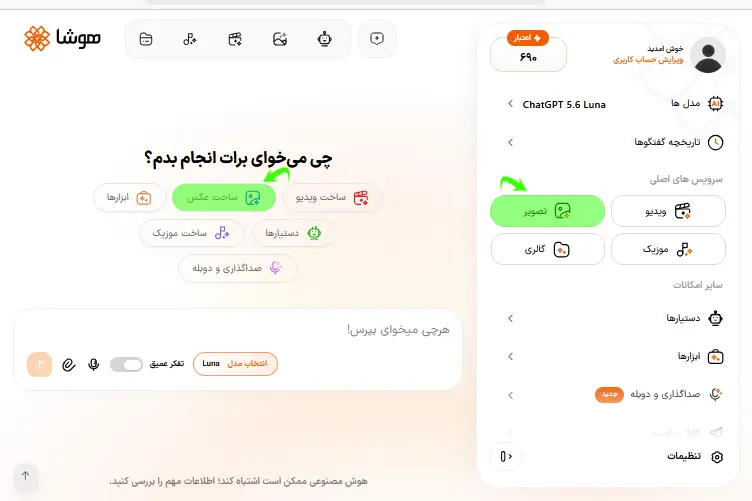
مرحله اول: ورود به سرویس ساخت عکس هوشا
پس از ساخت حساب کاربری در هوشا، طبق تصویر زیر، از طریق منوی سمت راست یا گزینههای دسترسی سریع وارد سرویس ساخت عکس شوید.
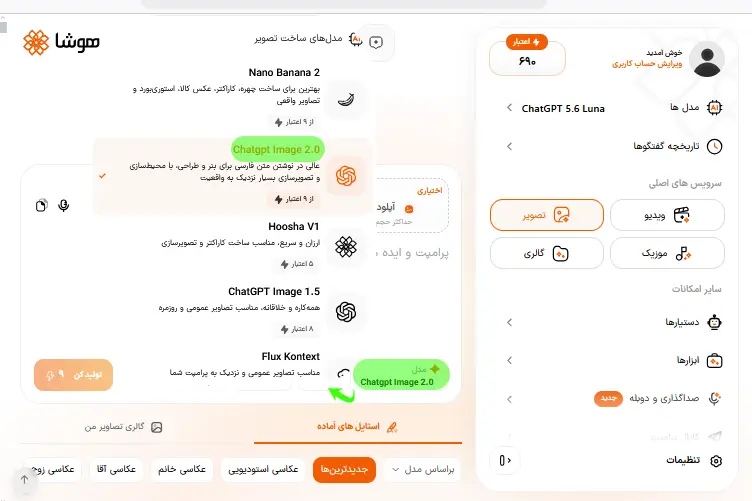
مرحله دوم: انتخاب مدل هوش مصنوعی
در این مرحله، از قسمت انتخاب مدل (اولین گزینه در گوشه پایین سمت راست کادر متنی)، مدل ChatGPT Image 2 را انتخاب کنید.
هوشا به طیف گستردهای از انواع ابزارهای هوش مصنوعی برای ساخت تصویر، از جمله Nano Banana 2 و Flux Kontext مجهز است؛ طبق تست ما، پرامپت «از کودکی تا پیری» با مدل ChatGPT Image 2 بهترین نتیجه را ارائه داده است. بنابراین، توصیه میکنیم برای اجرای این پرامپت، همین مدل را انتخاب کنید.
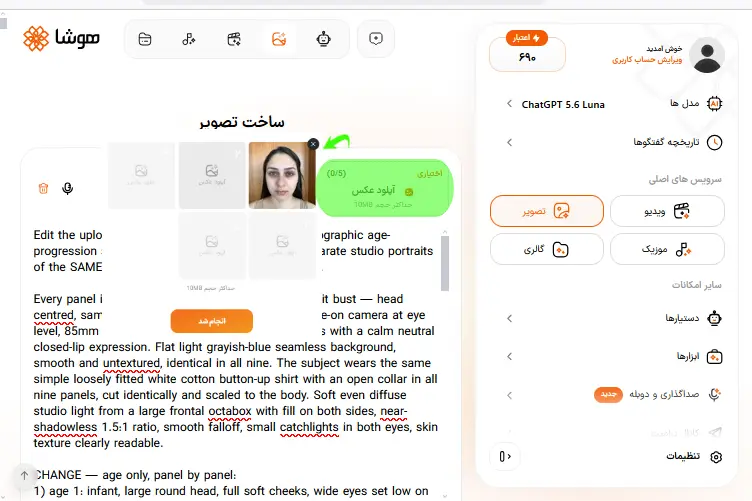
مرحله سوم: آپلود عکس مرجع و متن پرامپت آماده
در بخش آپلود عکس، یک عکس واضح و تمامرخ (رو به دوربین) از چهره خود انتخاب کنید. بهتر است تصویر با نور یکنواخت و بدون پوشیدگی بخشهای اصلی صورت باشد؛ زیرا کیفیت عکس مرجع میتواند بر حفظ شباهت چهره در سنین مختلف تأثیر بگذارد. سپس پرامپت آماده انتهای همین بخش را کپی کرده و در کادر متنی وارد کنید.
آموزش پرامپت نویسی عکس از مقدماتی تا پیشرفته
مرحله چهارم: اعمال تنظیمات برای تصویر خروجی
با توجه به نیاز خود میتوانید اندازه و کیفیت تصویر نهایی را انتخاب کنید. اندازه تصویر تأثیری بر میزان اعتبار مصرفی ندارد، اما انتخاب کیفیت بالاتر، اعتبار بیشتری برای تولید تصویر مصرف میکند.
بعد از اعمال تنظیمات، روی گزینه «تولید کن» کلیک کنید و منتظر تولید تصویر شوید.
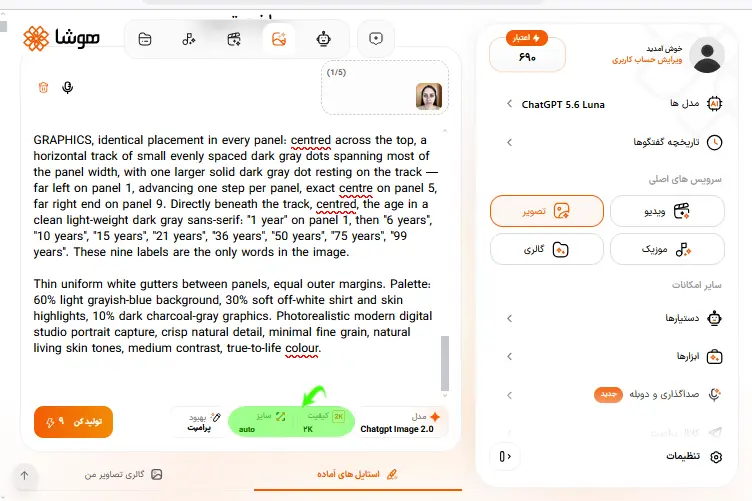
مرحله پنجم: دریافت تصویر ساختهشده
پس از اتمام فرایند ساخت تصویر، میتوانید ادامه مراحل را مطابق گزینههای موجود در تصویر، از راست به چپ دنبال کنید:
- گزینه دانلود: با انتخاب این گزینه، عکس خود را دانلود کنید.
- گزینه تغییرات: برای تغییر سایز یا کیفیت عکس، تنظیمات مورد نظر را اعمال کنید.
- گزینه بازآفرینی: اگر از نتیجه رضایت ندارید، با انتخاب این گزینه عکس را دوباره بازآفرینی کنید. از آنجا که هوش مصنوعی ممکن است با یک پرامپت مشخص، هر بار خروجی متفاوتی ایجاد کند، میتوانید پرامپت را چند بار امتحان کنید.
- گزینه مرجع: اگر میخواهید از همین تصویر در مرحله بعد برای ساخت ویدیو استفاده کنید، این گزینه را انتخاب کنید تا تصویر ساختهشده بهعنوان تصویر مرجع وارد فرایند ساخت ویدیو شود.
- گزینه پاک کردن: اگر از عکس رضایت ندارید، با انتخاب این گزینه آن را از گالری خود حذف کنید.
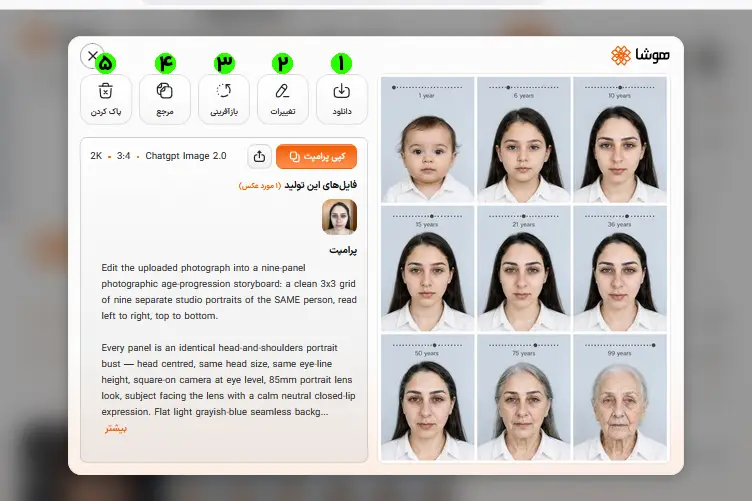
برای تست پرامپت آماده و ساخت تصویر از تولد تا پیری با هوش مصنوعی در هوشا از لینک زیر اقدام کنید:
نتیجه تست پرامپت از کودکی تا پیری با هوش مصنوعی در هوشا (Hoosha)
تصویر ۹ قابی تولید شده توسط هوش مصنوعی برای تغییر چهره از کودکی تا پیری:
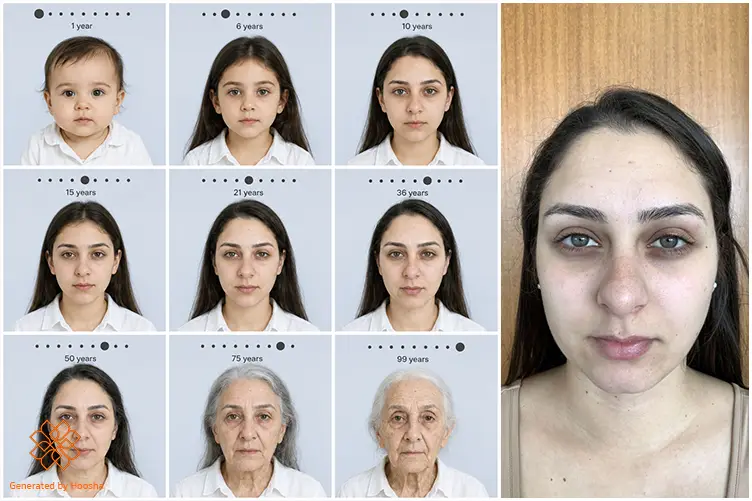
در ادامه، آموزش تصویری ساخت ویدیوی کودکی تا پیری با تصویر بالا در هوشا را برایتان آماده کردهایم.
آموزش ساخت ویدیوی کودکی تا پیری با هوشا
در این بخش، با استفاده از تصاویر خود در سنین مختلف، یک ویدیوی تغییر سن با هوش مصنوعی از کودکی و جوانی تا پیری (Young-to-Old Morph Video) میسازیم. برای این کار، از ساخت ویدیو با هوش مصنوعی در پلتفرم هوشا (Hoosha) استفاده میکنیم.
برای این منظور، مراحل زیر را قدم به قدم با هم پیش میبریم:
مرحله اول: ورود به سرویس ساخت ویدیو در هوشا
در صفحه اصلی هوشا، به یکی از روشهای نشان داده شده در تصویر، وارد قسمت ساخت ویدیو شوید.
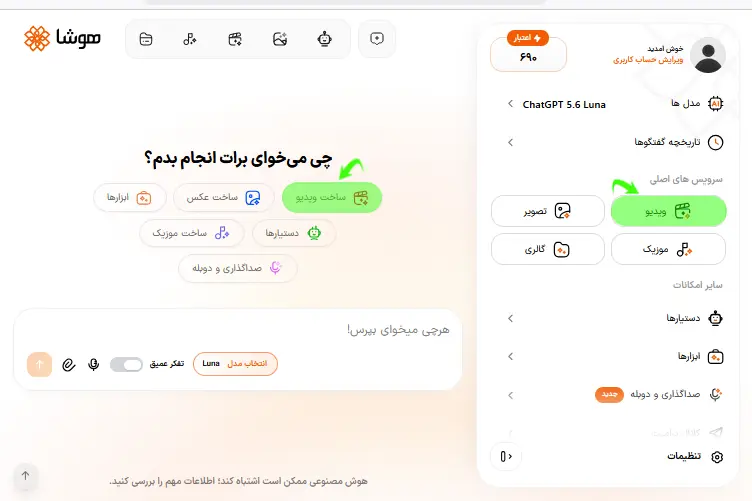
مرحله دوم: آپلود عکس مرجع و انتخاب مدل هوش مصنوعی
در این مرحله، تصویر کودکی تا پیری خود را از قسمت «آپلود تصویر» در گوشه بالای سمت راست کادر متنی، وارد ابزار کنید. سپس از میان ابزارهای هوش مصنوعی ساخت ویدیو در هوشا، Seedance 2.5 را انتخاب کنید.
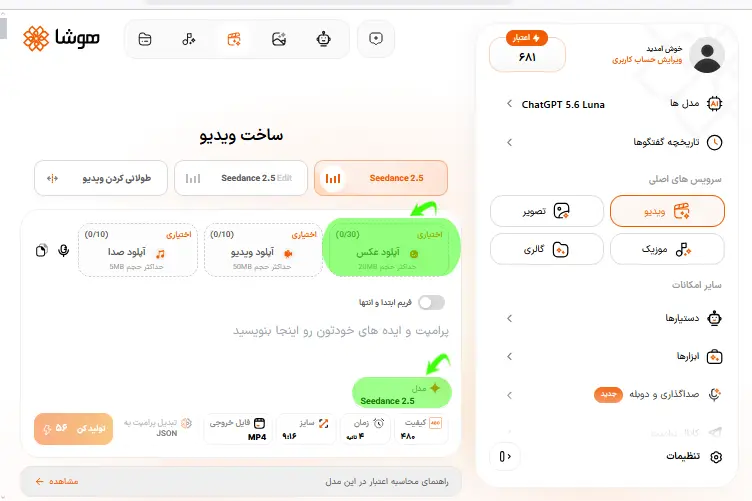
هوش مصنوعی سی دنس Seedance؛ نمونه خروجی + آموزش ساخت ویدیو
مرحله سوم: وارد کردن پرامپت و انتخاب تنظیمات
پرامپت آماده برای ساخت ویدیوی AI Age Progression Video را میتوانید از انتهای همین بخش کپی کنید. سپس سایز، کیفیت و فرمت فایل خروجی را از قسمت زیرین کادر متنی انتخاب کنید.
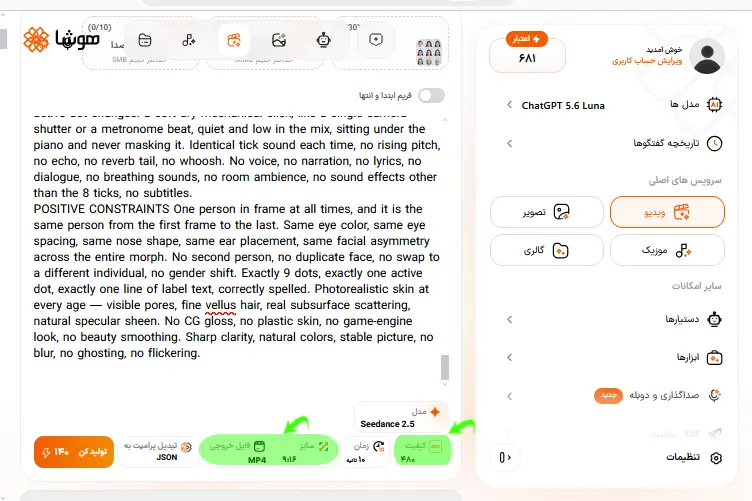
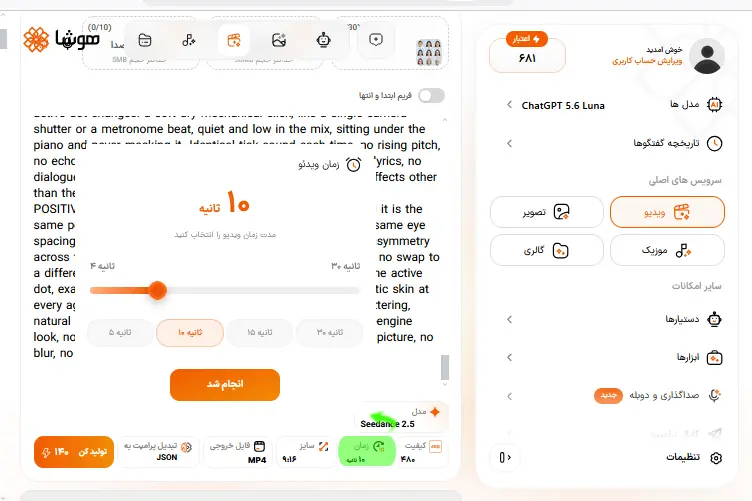
تنظیم مدت زمان ویدیو
در پرامپت آماده ما، مدت زمان ویدیو ۱۰ ثانیه در نظر گرفته شده است. بنابراین، در قسمت تنظیمات، مدت زمان را روی ۱۰ ثانیه و هماهنگ با پرامپت قرار دهید.
انتخاب موزیک پسزمینه برای ویدیو
اگر همان موسیقی تعریفشده در پرامپت را میخواهید، نیازی به آپلود فایل صوتی جداگانه ندارید. اما اگر موسیقی مشخصی دارید که میخواهید روی ویدیو استفاده شود، فایل آن را از بخش «آپلود صدا» اضافه کنید.
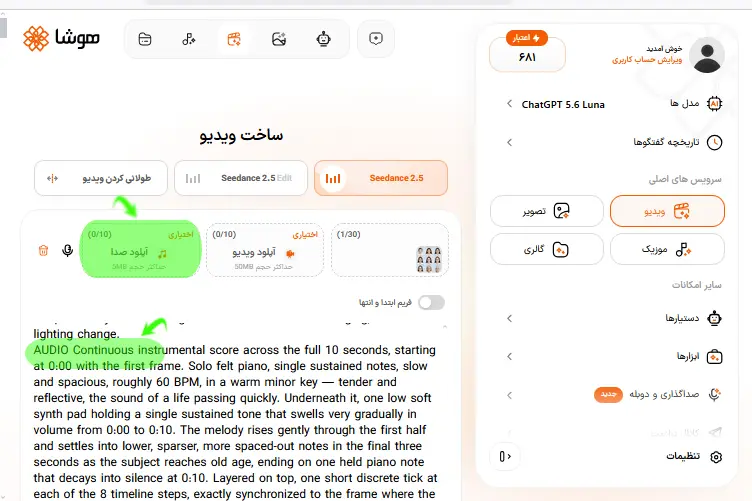
متن آماده برای درخواست موزیک دلخواه
اگر موزیک دلخواه خود را ترجیح میدهید، میتوانید از هوش مصنوعی بخواهید از موزیک شما بهعنوان موسیقی پسزمینه استفاده کند. برای این کار، پاراگراف AUDIO در پرامپت را با متن زیر جایگزین کنید:
| AUDIO Use the uploaded audio file as the background music for the full 10-second video. Start the audio at 0:00 with the first frame and keep it playing continuously throughout the video. Do not generate or add any other music, melody, sound effects, voice, narration, lyrics, dialogue, or ambient sounds. Do not modify the uploaded audio. |
متن پرامپت آماده برای ساخت ویدیوی کودکی تا پیری در هوشا
با استفاده از پرامپت زیر میتوانید ویدیوی Young to Old Morph Video از سن ۱ تا ۹۹ سالگی بسازید.
| SCENE CONTEXT One woman ages from 1 year old to 99 years old in a single unbroken morph, framed as a locked-off passport-style portrait against a pale blue-grey seamless backdrop. Above her head, a minimal dot-timeline graphic and an age label advance in sync with her face. The frame never shows anything except this portrait and its timeline. ACTIVE REFERENCES @image1 The uploaded reference image is an age-progression chart of a single female subject: olive-toned Mediterranean skin, dark brown hair, dark brows, warm hazel-brown eyes, white collared button shirt, pale blue-grey seamless studio backdrop. The reference supplies identity, wardrobe, backdrop, the nine age keyframes, and the design of the timeline graphic. It does not supply a grid layout — render one continuous full-frame portrait, never a multi-panel grid, never panel borders, never split-screen. FRAMING LOCK Every frame of this video is the same shot: head-and-shoulders portrait, centered, frontal, with the timeline band above. There is no other subject, no other location, no B-roll, no insert, no cutaway, no wide shot, no environment, no hands, no props, no background objects, no second setup. The camera never leaves this portrait for a single frame. FIRST FRAME AND SPATIAL BLOCKING The first visible frame already contains the one-year-old subject, centered, frontal, eyes to camera, with the timeline graphic already visible above her. No empty opening frame, no fade-in from black, no delayed reveal. Frame layout, fixed for all 10 seconds: Top 14% of frame is a clean graphic band on the same pale blue-grey backdrop. It holds a single horizontal row of exactly 9 evenly spaced dark charcoal dots, centered, spanning the middle 55% of frame width. Directly beneath the dot row, centered, sits one short age label in a plain dark grey sans-serif. Below the band, the portrait. Head centered on the vertical axis. Eyeline sits at 45% from the top edge and stays on that exact horizontal line for the whole take. Head height occupies a constant 42% of frame height from age 1 through age 99 — the toddler head is scaled to match adult head size, exactly as in the reference. Shoulders enter frame at the bottom third. Torso squared to camera. Gaze locked on the lens throughout, never drifting off-axis. TIMELINE GRAPHIC BEHAVIOR The 9 dots are static in position and never move, never reflow, never change count. One dot at a time is the active dot: it scales up to roughly double the diameter of the inactive dots and renders in solid dark charcoal, while all 8 inactive dots stay small and uniform. The active state steps from the leftmost dot to the rightmost dot across the take, one step per age keyframe, always advancing left to right, never backward. Each step is a fast clean scale change of about 0.15 seconds — the old dot shrinks as the new dot grows. No sliding dot, no travelling marker, no progress bar, no connecting line, no glow, no drop shadow. The age label swaps text at the same instant the active dot steps. Text swaps are instant and clean — no letter morphing, no crossfade, no typewriter effect, no motion blur on type. The label reads, in order and spelled exactly: “1 year”, “6 years”, “10 years”, “15 years”, “21 years”, “36 years”, “50 years”, “75 years”, “99 years”. Nothing else is ever written on screen — no watermark, no timecode, no captions, no subtitles, no extra numbers, no duplicate labels, no garbled characters. FORMAT MODE SINGLE CONTINUOUS TAKE. One shot. Real-time motion. Zero cuts, zero angle changes, zero reframing. No dissolve, no crossfade, no wipe, no flash frame, no transition effect. The only things that change in frame are the subject’s biological age, the active dot, and the label text. OPTICS 29° diagonal field of view, short telephoto portrait lens character, camera 4 to 5 meters from subject. Close framing achieved through lens reach, not physical proximity. Razor focus holds on the eyes and skin texture for the entire take, and the graphic band stays equally crisp. Flat seamless backdrop renders smooth and even with gentle falloff, not bokeh wash. Natural undistorted face proportions — no wide-angle nose enlargement, no barrel curve. No part of this shot becomes wide-angle or normal-lens coverage. CAMERA Camera fixed on a locked tripod at subject eye level, dead frontal, perpendicular to the backdrop. Absolute stillness for all 10 seconds — no handheld drift, no sway, no micro-push, no dolly, no zoom, no rack focus, no parallax. ACTION TIMING 0:00 to 0:01.3 — Age 1 to 6. Dot 1 active, label “1 year”. Round toddler face, soft cheeks, wispy fine hair, large eyes relative to the skull. Baby fat recedes, the midface lengthens, the nose bridge rises, hair grows past the shoulders in dark brown. At 0:01.3 the active state steps to dot 2, label swaps to “6 years”, and one soft tick sounds. 0:01.3 to 0:02.6 — Age 6 to 10. Cheekbones emerge, face narrows, jaw lengthens, brows darken and thicken, hair gains weight and slight wave. Step to dot 3, label “10 years”, tick. 0:02.6 to 0:04 — Age 10 to 15. Adolescent bone structure sets in, nose and chin reach adult proportion, lips fill slightly, faint under-eye shadow appears. Step to dot 4, label “15 years”, tick. 0:04 to 0:05.3 — Age 15 to 21. Features settle into young adulthood, jawline sharpens and squares, skin stays smooth with a few freckles across the nose bridge. Step to dot 5, label “21 years”, tick. 0:05.3 to 0:06.6 — Age 21 to 36. Face gains adult fullness, faint nasolabial folds form, first fine lines appear at the outer eye corners. Step to dot 6, label “36 years”, tick. 0:06.6 to 0:08 — Age 36 to 50. Skin loosens along the jaw, folds deepen, forehead lines and crow’s feet strengthen, first grey strands thread through the temples. Step to dot 7, label “50 years”, tick. 0:08 to 0:09 — Age 50 to 75. Hair goes broadly grey-silver and thins, upper eyelids hood, cheeks hollow, vertical lip lines and neck cording appear, age spots surface. Step to dot 8, label “75 years”, tick. 0:09 to 0:10 — Age 75 to 99. Hair turns fully white and sparse with scalp visible at the part, deep folded wrinkles cover forehead, eyes, cheeks and neck, lips thin, skin becomes translucent and papery, skull structure reads beneath. Step to dot 9, label “99 years”, final tick. The morph decelerates over the last 0.4 seconds and holds on the 99-year-old face, eyes still on the lens, rightmost dot active. PHYSICS The face morph is continuous interpolation, never a swap. Every frame is a photographically valid human face at a real intermediate age — no double exposure, no ghosting between two faces, no popping, no melting or liquid distortion, no features sliding out of anatomical position. Bone lengthens before soft tissue settles. Skin sag follows gravity downward. Hair greys progressively from the roots and temples outward with natural strand weight and slight settling delay as length changes. The white collared shirt remains the same garment throughout; only its fit, collar drape and fabric wear shift. Subtle involuntary life throughout: slow breathing, occasional natural blinks, minute head micro-settling. The graphic layer is separate from the photographic layer — dots and text are flat, crisp and rigid, with no perspective, no reflection, no grain applied to them, and are never distorted by the morph. LIGHTING Large soft frontal key from a broad overhead-front source, deliberately clean and even, clinical studio portrait quality — this flat frontal exposure is correct for this shot and must not be broken. Soft fill from below removes harsh under-eye shadow. Backdrop stays an even pale blue-grey with a gentle corner falloff. Lighting direction, color temperature, intensity, contrast and exposure are absolutely constant for all 10 seconds. No lighting shift, no grade drift, no flicker, no exposure ramp — every visible change on the face must read as aging, never as a lighting change. AUDIO Continuous instrumental score across the full 10 seconds, starting at 0:00 with the first frame. Solo felt piano, single sustained notes, slow and spacious, roughly 60 BPM, in a warm minor key — tender and reflective, the sound of a life passing quickly. Underneath it, one low soft synth pad holding a single sustained tone that swells very gradually in volume from 0:00 to 0:10. The melody rises gently through the first half and settles into lower, sparser, more spaced-out notes in the final three seconds as the subject reaches old age, ending on one held piano note that decays into silence at 0:10. Layered on top, one short discrete tick at each of the 8 timeline steps, exactly synchronized to the frame where the active dot changes: a soft dry mechanical click, like a single camera shutter or a metronome beat, quiet and low in the mix, sitting under the piano and never masking it. Identical tick sound each time, no rising pitch, no echo, no reverb tail, no whoosh. No voice, no narration, no lyrics, no dialogue, no breathing sounds, no room ambience, no sound effects other than the 8 ticks, no subtitles. POSITIVE CONSTRAINTS One person in frame at all times, and it is the same person from the first frame to the last. Same eye color, same eye spacing, same nose shape, same ear placement, same facial asymmetry across the entire morph. No second person, no duplicate face, no swap to a different individual, no gender shift. Exactly 9 dots, exactly one active dot, exactly one line of label text, correctly spelled. Photorealistic skin at every age — visible pores, fine vellus hair, real subsurface scattering, natural specular sheen. No CG gloss, no plastic skin, no game-engine look, no beauty smoothing. Sharp clarity, natural colors, stable picture, no blur, no ghosting, no flickering. |
مرحله چهارم: دریافت ویدیو
در این مرحله با انتخاب گزینه تولید کن، ویدیوی ۱۰ ثانیهای از کودکی تا پیری با هوش مصنوعی برای شما در عرض چند دقیقه آماده دانلود میشود. در ادامه نتیجه ساخت ویدیو با پرامپت بالا را مشاهده نمایید:
ویدیوی از کودکی تا پیری با هوش مصنوعی
نکاتی برای گرفتن نتیجه بهتر از تغییر چهره از کودکی تا پیری
رعایت نکات زیر میتواند تأثیر زیادی بر کیفیت خروجی تصاویر و ویدیوی کودکی تا پیری شما داشته باشد:
۱. از عکس مرجع باکیفیت استفاده کنید.
عکس واضح با نور یکنواخت و زاویه روبهدوربین، نتیجه بهتری ایجاد میکند و به حفظ ویژگیهای چهره کمک میکند.
۲. پرامپتها را دقیقاً کپی کنید.
پرامپتها را به همان شکل و به زبان انگلیسی وارد کنید. حذف یا تغییر بخشهای آنها ممکن است جزئیات مهمی مانند حفظ هویت چهره یا نحوه نمایش تایملاین را تحت تأثیر قرار دهد.
۳. برای ساخت ویدیو از همان تصویر ۹ قابی استفاده کنید.
تصویر ۹ قابی مرحله قبل را بهعنوان مرجع وارد کنید و از یک عکس ساده استفاده نکنید؛ زیرا این تصویر ترتیب مراحل تغییر سن را مشخص میکند.
۴. دستورهای مربوط به ویدیو را حذف نکنید.
بخشهایی مانند نحوه تغییر تدریجی چهره، تایملاین و صدا در نتیجه نهایی تأثیر دارند؛ بنابراین آنها را بدون دلیل حذف یا ویرایش نکنید.
جمعبندی
ساخت عکس و ویدیوی کودکی تا پیری با هوش مصنوعی، راهی ساده برای مشاهده تغییر چهره در سنین مختلف است. در این آموزش، با استفاده از یک عکس مرجع و پرامپتهای آماده، ابتدا تصویر خود را در سنین مختلف ساختیم و سپس آن را به یک ویدیوی کوتاه تغییر سن تبدیل کردیم. خروجی واقعی هر مرحله نیز در اختیار شما قرار گرفته است تا بتوانید نتیجه را بهتر ارزیابی کنید.
برای اجرای این مراحل میتوانید از پلتفرم هوشا (Hoosha)، بدون نیاز به نصب نرمافزار جداگانه و با دسترسی از طریق مرورگر و موبایل استفاده کنید؛ همچنین امکان پرداخت ریالی و قسطی از طریق اسنپپی، فرایند استفاده از این ابزار را برای کاربران ایرانی سادهتر میکند.
نویسنده: سپیده بزازی
ورود به سرویس ساخت ویدیوی هوشا و بررسی امکانات مختلف آن از لینک زیر:
آیا برای تبدیل عکس به آینده با هوش مصنوعی نیاز به نصب برنامه جداگانه دارم؟
خیر؛ این کار از طریق سایت هوش مصنوعی چهره آینده و بدون نیاز به نصب برنامه جداگانه انجام میشود؛ این قابلیت در هوشا نیز از طریق وبسایت، وباپ و ربات تلگرام در دسترس است.
آیا میتوان از هوش مصنوعی پیری چهره در آیفون هم استفاده کرد؟
بله، پلتفرمهای ارائهدهنده این قابلیت، از آیفون پشتیبانی میکنند. هوشا نیز از هر ۳ مسیر وبسایت، وباپ و بات تلگرام برای آیفون و اندروید در دسترس است.
مدت زمان ساخت از کودکی تا پیری با هوش مصنوعی چقدر طول میکشد؟
با داشتن پرامپت آماده و عکس مرجع، در مدت زمانی کوتاه (حدود چند دقیقه) میتوانید هم تصاویر و هم ویدیوی کودکی تا پیری خود را بسازید.
آیا تبدیل عکس به آینده با هوش مصنوعی رایگان است؟
امکان ساخت این تصاویر و ویدیوها در برخی پلتفرمها بهصورت رایگان وجود دارد؛ اما بسته به پلتفرم، کیفیت خروجی و امکانات، گزینههای رایگان و پولی متفاوتی در دسترس است.
 قابلیت Composer predictions در Codex؛ رونمایی از دستیار پیشبینی پیام
 Claude Dashboards معرفی شد؛ ساخت داشبوردهای تحلیلی بدون کدنویسی
  هوش مصنوعی گاما؛ آموزش ساخت ارائه فارسی + قیمت و امکانات Gamma
 آموزش چت جی پی تی؛ راهنمای تصویری محیط کار، گفتوگو و ساخت عکس
 اسکیل هوش مصنوعی؛ راهنمای ساخت و استفاده Skill در ChatGPT و Kimi
